Black and White.
Showing posts with label system. Show all posts

Thursday, January 31, 2008

The 13 "Best of the Best" Free File Hosting Options

Need to store your files online? There are hundreds if not thousands of options, but the trick is picking out the cream of the crop. Some sites have long registration requirements, slow upload speeds, and annoying ads, or worse.

This list has been narrowed down to the best of the best file storage options, guaranteed to be stable, free, generous with file size limits, offer lots of space, and top things off with some really cool features.

adrive logo

1. ADrive is an online storage provider offering tons of space - 50 GB to be exact - and their generous 2 GB file size limit lets you make the most of it. You can get a free account and then upload all your files through the web browser interface, then you can keep your files private or share them with a simple click of the mouse.

Link: www.adrive.com

mediamax logo

2. MediaMax (formerly StreamLoad) gives you a free account with 25 GB of secure storage space that works well for private storage and file sharing.

Link: www.mediamax.com

humyo logo

3. With Humyo you get a total of 30 GB of free space, which is awesome for secure file storage and sharing, along with other sweet options for streaming and embedding media files. To top things off you can access Humyo from any web or mobile phone browser.

Link: www.humyo.com

divshare logo

4. DivShare is a different take on file storage. It allows you to store files and view them online without downloading them - watch streaming video, view photo slideshows, read documents, or listen to streaming audio. Plus, it easily integrates with Facebook, Wordpress, and the Apple iPhone. The free account gets you 5 GB of storage space.

Link: divshare.com

dropio logo

5. Drop.io is another unique storage provider that lets you setup secure file "drops" between specified groups of people. It's totally secure and you can setup as many drops as you want, and you have the option of adding files via web browser, email, or phone! It's very simple but very useful.

Link: drop.io

filefactory logo

6. FileFactory is "the leader in free unlimited file hosting." You can upload files for storage or to send to a friend, with a generous 300 MB limit per file and the ability to upload 25 files at once. There is even a desktop application and Facebook app to let you upload files from anywhere. Once your files are uploaded you can create photo slideshows, music widgets, and more.

Link: www.filefactory.com

mediafire logo

7. MediaFire offers 100% free file hosting with unlimited space (except for a 100 MB file size limit.) Registration is optional so you can quickly upload files or sign-up and get an account to manage your uploads. MediaFire has been getting rave reviews from PC World, PC Magazine, and more.

Link: mediafire.com

badongo logo

8. Badongo, despite the funny name, means business. You get unlimited space with a whopping 1 GB file size limit, all 100% free. Extras include slideshow creators, music players, and more.

Link: www.badongo.com

xdrive logo

9. XDrive is like having a second hard drive offering 5 GB of free space. Use it for secure remote file storage or file sharing with friends and family. New features include photo slideshows, automated scheduled backups, and desktop software.

Link: www.xdrive.com

dropboks logo

10. DropBoks offers free online storage, just like an online "drop box." You get 1 GB free, but the real beauty is the clean and simple interface that anyone can understand.

Link: www.dropboks.com

diino logo

11. Diino is "your internet desktop" where you can store up to 2 GB of files, free of charge. Then you can share them or just access them from anywhere you have an internet connection. Other features include free email, a free blog, collaboration space, and the ability to run scheduled backups.

Link: www.diino.com

esnips logo

12. eSnips offers a cool 5 GB of free storage plus custom playlists, widgets, and a "social DNA" feature that compares you to other users based on the files you upload. If you are looking for community features to go with your file storage, eSnips could be for you.

Link: www.esnips.com

driveway logo

13. Driveway is for sharing individual files and offers a generous 500 MB file-size limit, not to mention a selection of widgets. You can even share files straight from your desktop with just a right-click.

Link: www.driveway.com


----------------
Now playing: Enigma - Enigma - Silence Must Be Heard
via FoxyTunes

Friday, November 30, 2007

Tiny Linux PC uses just 8 watts of power, can be solar powered - The Aleutia E1

Check out the Aleutia E1 mini Linux PC.

Aleutia E1

This mini PC uses just 8 watts of power which is a quarter of the power used by the average laptop.

Aleutia E1

It comes in a tough aluminium case and has no moving parts, it is also completely silent, and comes with everything you need including office compatible software, it runs Puppy Linux.

Aleutia E1

You can also add on an optional solar panel to power the device and an optional 10.4 inch LCD screen which uses just 10 watts of power.

Aleutia E1

Updated 30/11/07

Here’s the specs for the people that asked.

  • Processor: 200MHz x86 CPU, Memory: 128MB SDRAM, Storage: 2GB (included Compact Flash card), Power Supply (US, UK, or EU).
  • 3 x USB 2.0 ports (12Mbps transfer rate), 1 x 10/100 Ethernet port, VGA port to connect LCD display (supports resolutions up to 1280×1024).
  • Power consumption of 8W with CPU and SDRAM running at full speed. With external devices (USB 2.0 CD Rewriter, USB-powered hard drive) power consumption rises to 11W.
  • Dimensions: 11.5cm (Width) x 11.5cm (Lenght) x 3.5cm (Height).
  • Puppy Linux Operating System (version 2.14) - similar in appearance to MS Windows, stable, and pre-installed.
  • Excel-compatible spreadsheet software (Gnumeric), Word-compatible word processor (Abiword)

The Aleutia E1 is available to buy online form Aleutia from £199 (about $400).

Thursday, November 29, 2007

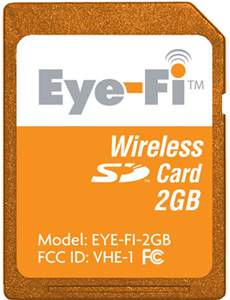
Eye-Fi Wireless SD Card


First your phone went wireless, then your laptop, now finally, your camera!

Never scrounge around for a USB cable again! Eye-fi is a magical orange SD memory card that will not only store 2GB worth of pictures, it’ll upload them to your computer, and to Flickr, Facebook, Picasa (or 14 others) wirelessly, invisibly, automatically!

This little guy looks like a normal 2GB memory card and works with nearly any camera that takes SD memory. There are no antennas, no protrusions, no subscription fees, and no cables.

Here’s how it works: You set up the card once with the included USB card reader (tell it which wireless network it should use, and type in the password if you have one), choose the photo sharing service of your choice (you have plenty of options), then slip the card in your camera. From then on, you never have to touch anything. Just take photos. Whenever your cameras near the wireless network you selected and idle, Eye-fi will upload all your photos (JPEGs only) to your online photo sharing service. Next time your computer’s online, they’ll download there, too!

Yes, it is practically magic.

It’s amazing for anyone who loves photography, but also great for computer unsavvy parents and grandparents. Set up their photo sharing account, slip an Eye-fi in their camera, and your mom’s finally your Flickr friend!

Saturday, October 27, 2007

Designing For Every Browser: How To Make Your Site Fully Cross Browser Compatible


So Many Browsers

What consumers see as freedom of choice when choosing a browser, CSS coders see as a nightmare. Here’s a quick list of popular browsers, just off the top of my head:

Tuesday, October 23, 2007

3DMark Vantage will need a Ninja PC

THE WORLD+dog awaits the release of 3DMark Vantage, the next-generation benchmark upon which millions of computer users rely on to see what kind of performance they can expect.

To kick-off the marketing and technology spiel, Yougamers came up with a new revision of Game-O-Meter. This test checks your system for possible problems in running the desired application, mostly in the range of all components of decent speed.

The development of 3DMark Next, or 3DMark Vantage is now drawing to its final moments, with the latest step being defining the system requirements.

So, the system required to run 3DMark Vantage is following - starting with minimum one:

X86/x64 single-core processor with SSE2 support - Athlon 64 2800+ and Pentium 4 Prescott are bare minimum here.
Fully D3D10/SM4.0 compliant graphics card, 256MB - entry-level GeForce 8 or Radeon HD 2000. Expect FPM (frames per minute) if you own these boards.
1024MB RAM - nothing unreasonable here, 1GB of memory is a very bare minimum for Vista
2GB Free Disk Space - in case swap file goes crazy + the installation files themselves
Windows Vista (Server Editions not supported) - With DX10, sadly mandatory Vista comes along. Let's hope MS can fix the OS with SP1, even though... glass is either half-full or half-empty. And we do advise you to have a dual-boot.

In case of recommended system, guys went a bit more in depth:

Intel Core 2 Duo E6600 or equivalent AMD CPU - we would add or equivalent Intel CPU, since most of users buys lower spec CPUs and overclocks them to heavens' high. In case of AMD, play around with HyperTransport and overclocking, you do need 2.4-2.6 GHz clock speed for your dual-core CPU.
Fully D3D10/SM4.0 compliant graphics card, 512MB - nothing earth shattering here. You need 2900XT, 8800GTS with 640MB. New 8800GT and 38x0 are expected to do just fine.
2048MB RAM
2GB Free Disk Space - same as above.
Windows Vista (Server Editions not supported) - same comment as minimum spec applies.

No doubt a story about 3DMark Vantage or PC Mark will bring another avalanche of "canned benchmarks" e-mails in my in-box, but when it comes to synthetic vs. real-world, can anyone with reasonable logic dispute the need for existence of the two?

When you buy a car magazine, you'll read the impressions of test drivers about the car they've drove -but if publication is any good, they will have test on a race track or a closed course, which has specific

3DMark, PCMark, Everest, SiSoft Sandra, SPEC - the performance in these tests is important. Whether 3DMark Vantage turns out to be Hungaroring/Monte Carlo or Monza/Spa, remains to be seen - All we see is a lot of curves ahead

Sunday, October 14, 2007

Nvidia Readies 3-Way SLI Technology

Nvidia is stepping up efforts on getting 3-way SLI ready for launch on Nov 12th. However, to get 3-way SLI up and running, there are a few requirements. Firstly you need a 3-way SLI drivers. Secondly, you need either a 680i SLI or the upcoming 780a/780i SLI board with at least 3 PCIe x16 slots. Thirdly, you need either GeForce 8800 Ultra or GeForce 8800 GTX cards as these cards have 2 SLI connectors on each card. Even the upcoming G92 cards will not support since it has only 1 SLI connector. Fourthly, you would need a 3-way SLI bridge card.

interesting diagram showing us how the cards connect to each other in a 3-way SLI config. Card A connects to Card B, and B connects to C and then C connects back to A. It is probably an expensive connector and comparatively, AMD Crossfire X solution seems cheaper to implement.


----------------
Now playing: Kaadhalan - Kathalikkum Pennin Kaigal
via FoxyTunes

Sunday, September 09, 2007

Privacy Enhanced Computer Display

The privacy-enhanced computer display uses a ferroelectric shutter glasses and a special device driver to produce a computer display which can be read only by the desired recipient, and not by an onlooker. The display alternately displays the desired information in one field, then the inverse image of the desired information in the next field, at up to 120 Hz refresh. The ferroelectric shutter glasses allow only the desired information to be viewed, while the inverse image causes unauthorized viewers to perceive only a flickering gray image, caused by the persistence of vision in the human visual system (as illustrated here). It is also possible to use the system to "underlay" a private message on a public display system.

Background & Objective: The Privacy Enhanced Computer Display is appropriate for situations where a computer display is to be located in a publicly accessible area, but the display itself may show information that should be kept private. Places such as banks (bank balances) hospitals (patient health information), pharmacies (drug information), airline ticketing and airport gate agent stations (passenger and security information) are all candidates for a privacy-enhanced computer display.

Technical Discussion: The system consists of two display sources (the public display image Pij and the secret display image Sij) a special device driver, a fast-refreshing CRT, and a set of synchronized ferroelectric shutter glasses. If there is no desired public display, the RGB value (255, 255, 255) can be used. The special device driver alternately displays images of (Pij - Sij ) and ( Sij ). The human eye's persistence of vision blurs the two images into (Pij - Sij + Sij ) / 2, which reduces to Pij / 2, which is the public image, without any secret image being visible. To someone wearing the synchronized glasses, only the Sij image is seen.

Future Direction: The current system uses wired shutter glasses; we will consider upgrading to infrared at some time in the future. We will also explore using other display technologies such as LCD and DLV (digital light valve) systems.


source


----------------
Now playing: Akon - Don't Matter (Calypso Remix)
via FoxyTunes

Friday, August 24, 2007

1TB CD disks are coming

AN ISRAELI storage technology outfit is nearly ready to bring the next big thing in optical storage disk into the shops.

Mempile's schematic two photon system is called TeraDisc and is designed to shove 1TB on a single disk.

According to TFOT.com, here, the disk overcomes all the limitations of existing formats.

Each disk is built from polymethyl methacrylate which is almost entirely transparent to the specific wavelength of the laser used by its recorder.

Dr Beth Erez, Mempile’s Chief Marketing Officer thinks that its ePMMA, disks can create a media with about 200 virtual layers five microns apart which each hold 5GB of data.

The current prototypes can store 600–800GB per disk which is a lot of data. However Mempile boffins think that they can get this to a 1TB per 1.2mm thick disk soon.

Erez says her disks can last 50 years and should be very reliable. The first prototype is 18 months away and will be in the shops about a year afterwards.

Initially it will use red laser technology. Mempile want to move to blue lasers later and create 5TB of data per disk.

Erez thinks that a drive will set you back $3,000 while the 600GB disk will cost $30-50. Still 600 GB should just about cover all those snaps Mrs Farrell took when going to the sea coast this year (It would have taken two disks but it rained)

----------------
Listening to: A.R. Rahman - Pray For Me Brother (Instrumental)
via FoxyTunes
Monday, August 13, 2007

Intel intros 3GHz quad core processor

CHIP FIRM Intel said it has introduced two quad core server chips ahead of schedule and set pricing to drive the market. [Surely drive AMD mad? Ed.]

The Xeon X5365 is a 3GHz quad core chip which runs at 120 watts, and has a front side bus speed of 1333MHz. The L5335 is a 2GHz chip which runs at 50 watts.

Intel claims that a Fujitsu Siemens Primergy RX300 S3 server using the 5365 scored 98.9 using the SPECint_rate-base 2006 benchmark.

The chips include Intel's virtualisation tech and the firm said the chips have additional extensions for better interrupt handling using Windows 32-bit OSes.

The chip firm is pricing the X5365 at $1,172 and the L5335 at $380.

As we reported in June, chip rival AMD will introduce two "Barcelona" quad core chips on September 10th

Tuesday, August 07, 2007

Nvidia launches Quadro VCS GPU server

A DAY AFTER DAAMIT revealed its FireGL line-up of professional graphics cards, Nvidia came up with a press release stating that the company is launching the QuadroPlex Visual Computing System, or VCS in short.

The model goes by the name VCS Model S4, which is a short name for a 1U server case featuring four heavily modified Quadro boards creating a very dense GPU array. This product is intended for data-centric apps such as off-line rendering, remote graphics applications, and embedded visual computing. In short, the company is dead set on killing the data centres consisted out of CPUs in movie and TV production industry.

These four modified boards are based on Quadro FX 5600 (has nothing in common with GeForceFX 5600 sans the name), a G80GL GPU powered board, with 1.5 GB of GDDR-3 memory. This monster of a board comes with 71.6 GB/s of bandwidth (memory clock is set at 1.49 GHz), making a combined total of 286.4 GB/s, an astonishing figure by any account.

Overall, the frame buffer reached 6GB, so large textures can be processed with Full-Scene AntiAliasing to extreme details. Nvidia claims that S4 server comes with accelerated 3D texture performance as well, for neat visualization of datasets used in energy and scientific research. Read: we want our piece of GPGPU pie.

Of course, this product is not intended to be used as a single product, but as one of numerous units in something that we could start pronouncing as "Visualization Datacentres" or products for "Visualization server room." Kudos to Nvidia for creating a completely new segment of the market, and once this gets rolling there is no turning back. We figure that by now you have understood why Intel is considering Nvidia to be its biggest threat, right.

This product will be available in Q4 2007, and you can expect a whole lot of Hollywood movies and more importantly, TV series productions to rely on QuadroPlex. Pricing was not announced, but that does not matter anyways - what AMD and Nvidia have done in the past couple of years was total crash of the budgets required to create special FX. From rendering farms built by SGI, we have come at the time when GPU workstations are good enough for full-blown previews, and taking over the rendering segment was just the matter of time.

Sadly, the only thing missing for resounding success are the weird ways how Nvidia treats its partners, regardless of being a software vendor, add-in board partner or member of the press. Nvidia's head of PR stated to us that the company is not launching anything at Siggraph, but relying on what a PR says is equal to believing in the tooth fairy

----------------
Listening to: John Powell - Extreme Ways (Bourne's Ultimatum, by Moby)
via FoxyTunes
PS3 gets ready to rumble with DVR

TO START THE round-up this week we'll begin by offering you the link to the new Penny Arcade Adventures trailer courtesy of the new look Joystiq. Lets hope it lives up to the glorious art work, and the genius of PA.

Next up, before we concentrate on the console war, is one of the first looks at Direct X 10 performance in Lost Planet, producing interesting results. Oh and another preview of Far Cry 2 via CVG.

PS3/PSP
Prototypes of the new rumble-enabled PS3 SixAxis controller are already in the hands of numerous Sony developers, according to industry insider site Inner Bits - via Next-Gen.biz.

A blog on the site where “game developers speak out” says that “new versions of the Sixaxis controller are quietly replacing the original controllers launched with the console.”

As well as being rumble-enabled, new controllers will allegedly have improved motion sensitivity.

Sony is to launch a digital tuner for the Playstation 3 in early 2008, offering DVR-like functions to users of the console, reports Gameindustry.biz.

Warwick Light, sales and marketing manager for Computer Entertainment New Zealand, revealed the details to local website The Press, promising to "transform the PS3 capabilities so as to meet people's changing entertainment needs."

"We're also hoping next year – about the same time that Freeview launches its terrestrial broadcasting service – to release a digital tuner for the PS3, turning it into a programmable TV recorder," said Light.Freeview services are expected to launch in New Zealand next March.

Sony’s chief financial officer has revealed that the company’s recently reported games division losses were less than expected – because of the lack of Playstation 3 consoles sold at a loss.

"Sales of the PS3 have risen but we booked losses due to our strategic decision to price it below the (production) cost. Actually, because the number of units sold was not as high as we hoped, the loss was better than our original expectation," Sony’s CFO Nobuyuki Oneda said.

Maybe sales may be improved via other avenues. A Sony developed prototype computer board that utilizes the Playstation 3 Cell chip is set to be unveiled for the first time next week.

According to PC Advisor, The 'Cell Computing Board' combines the power of the Cell’s microprocessor and RSX graphics processor resulting in a high-power computing platform that goes beyond the power of the Cell chip alone.

It's possible of course that Sony won't be able to bring it to market - seeing as Sony is being sued over the design of the Cell processor.

Sony America is being taken to court by California-based Parallel Processing Corporation over the Cell chip in the Playstation 3.

The company alleges that Sony products infringe on a patent approved in 1991 for "synchronised parallel processing with shared memory," according to a report on GameSpot.

The complaint states that the infringement is "causing irreparable harm and monetary damage," to the company.

Better news for PS3 fanboys comes from Rockstar. While Sony may have lost out to Microsoft with regard to exclusive Grand Theft Auto IV content, the company has revealed that Rockstar is set to produce an exclusive new franchise for Sony's next generation console, one that 'can only truly be done' on Playstation 3.

Xbox 360
Whilst PS3 fans got good news from Rockstar, 360 followers got bad news from Take Two - the company confirmed that Grand Theft Auto IV has been pushed back from its original October 2007 release date into fiscal 2008, Gamesindustry.biz reports.

Further rumblings from the 360 community concerning the rumoured price-cut have come thick and fast this week.


----------------
Listening to: Karthik, Harish Ragavendra - Koo Koovena
via FoxyTunesJoystiq produced a Circuit City (US) banner showing all three 360 SKUs receiving a price cut.

The banner shows that from the beginning Aug. 12 the Xbox 360 premium will be $350, the Elite will be $450 and the Core will have a $20 break and will come in at $280.

However, Microsoft has told Next-Gen.biz that it has no plans to lower the price of the Xbox 360 in the UK, despite mounting speculation that it intends to drop the price of the console stateside.

Further price-cuts could come from smaller components courtesy of another die shrink.

One of the contractors responsible for manufacturing CPU's for the Xbox 360 has revealed that it is currently working on a 45-nanometer design, due for release late next year or early in 2009.

"We have customers' activity for products in the CPU space that goes into a video game device," said Chartered Semiconductor Manufacturing's CEO Chia Song Hwee, reports PC Advisor.

"As 65nm just started production in the last two quarters, you would expect 45nm to come on stream about 18 months from that timeframe," offered Chia, referring to an expected production time-frame.

Hopefully Microsoft can incorporate other design changes by then. Techon has employed a thermal design expert to look more closely at the 360's design, which provides in-depth analysis and interesting reading.

The designers might also wish to incorporate the HD-DVD drive - apparently, planned elements of the PGR4 have had to be removed because they will not physically fit onto a single DVD disc.

Lets finish the 360 news with something a bit lighter - actual pictures of the Halo 3 replica guns we mentioned last week.

Wii/DS
Wedbush Morgan analyst Michael Pachter has forecast that Nintendo may release a high definition Wii in two to three years time in a bid to ensure consumer enthusiasm for the console doesn’t fade.

"Consumers may hope for improved graphics, and my guess is that Nintendo will comply," Pachter told GamePro.

"In two or three years, commodity prices for graphics processors and CPUs may decline to the point that a High Definition Wii could be introduced. If so, Nintendo will likely introduce one," he added.

A number of industry insiders have recently suggested that enthusiasm for Nintendo’s Wii could fade in time due to its technical limitations.

Though this isn't currently hurting consoles sales. Nintendo Wii outsold Sony's Playstation 3 by a ratio of over 4 to 1 in Japan in July, game magazine publisher Enterbrain said last Friday.

Nintendo sold 396,752 units of the Wii in the five weeks ended July 29, compared with 91,987 units of the PS3.

Expect even bigger sales - The Japanese Wii supply is apparently normalizing.

We've seen plenty of Wii peripherals recently, but this is a new one - a Wii aeroplane controller - perfect for a new edition of Pilotwings maybe?

TGDaily got more time with another peripheral - the Wii fit and the Balance Board, which is shaping up to look like a novel product...thought the lazy gits at MTV news found another way to use it - sitting on it.

source


----------------
Listening to: Karthik, Harish Ragavendra - Koo Koovena
via FoxyTunes

Sunday, August 05, 2007

Sony releases SSD laptop with 11.5hr life

SOLID STATE DRIVES (SSDs) will probably be the main selling point for top end notebooks this autumn, and Sony will join the battle with the release of the TZ18GN, the first Vaio computer with one inside.

The capacity isn't exactly earth shattering. Sony opted for a 32GB capacity. The price difference between this 32GB one and TZ17GN (100GB drive) is a massive $700. So, for $4,300 you get 68GB less capacity and half an hour more battery life.


Appearance is so sleek that even Apple fanbois might get jealous

My own notebook cost over $4,000 16 months ago, and nothing has changed when it comes to asking price for a notebook with solid-state drive. Somehow we wish that these $650 drives from Sandisk came into production earlier, and that the difference between SSD and regular ones was around $500.

This laptop is based on a very small frame - the 11.1-inch LCD screen is stretched from one end to another, since overall dimensions are just 22.7 x 2.25 x 19.8 cm. It weighs 1.2 kilograms, and claims a battery life of 11.5 hours.


this lappy dosent contains bluray :(
----------------
Listening to: artist - PANI THULI
via FoxyTunes

Ultimate compact gaming case tested

THE MOBILE GAMING MARKET is currently a field of battle between manufacturers that produce gaming notebooks and those that produce small form factor cases that fit desktop components. Charlie recently published his take on the gaming notebook market, and I could not agree more.

Carrying around heavy notebooks like big ones from Dell's XPS series just does not cut it. In an ideal world, laptop manufacturers would not act like conservative cans and avoid implementation of PCIe External connector, thus generating possibility to upgrade the graphics subsystem with 8800/2900 graphics cards in their own case. However, sadly, since PCIe External 1.0a spec was not implemented by notebook makers, you are stuck with either carrying around 5-10 kilos on your back, or opt for a mobile gaming rig.

After being in the same hotel for seven weeks last year with nothing else but my Samsung Q30Plus-SSD (yes, subnotebook with integrated craphics), I decided to go out and find a case that would be easily transportable in planes (author of this article flew 114.000 miles this year, mostly in economy class). Yet, it had to have powerful hardware to play some games.

Bear in mind that my goal was to host only the best on the gaming market, so system had to endure not less than two gigs of memory, a quad-core processor, and a GeForce 8800 board. I did not want to hear about gaming with allegedly gaming cards such as 2600XT or 8600GTS. These boards were designed with only one thing in mind (conquer highest market share in notebook segment), so I was interested in something with at least 300W PSU.

We met with Sean from GTR Tech a while back at E3. This bright lad is usually pissing off rich people in amateur racing league, where his Mitsubishi Lancer Evo likes to smoke the beemers, dodges and other weekend-racers. When he is not pissing richboys off, he designs things like GT3 case. Sean explained to us that his goal was to create portable racer, a case that you can take just like your notebook, but this case will endure components that are thermally challenging all those smaller cases on the market.

Thus, GT3 was born. This case is relatively expensive (asking price is 250 dollars), so we were interested can this product eat up all of our components. When it comes to beaching about the price, bear in mind that we plan to place over 2000 dollars of gear inside, so saving on a case is not a subject. If you are on a budget, you can fit Athlon 64 X2 or entry-level C2D processors on an NForce powered board, overclock it, and stay inside 1000-dollar range even with 8800GTS board inside.

Carbon-fibre looking saviour

It is actually far smaller case than it looks... and packs a punch

Carbon-fibre look is sadly, just the look - but in reality, using carbon fibre chassis would skyrocket the price upwards. Case is actually a combination between SECC steel, aluminium, and plastics.

Front side has big GT3 logo that glows in nice and pleasant blue colour, giving clear sign that is in charge of this one. Our big complaint comes from the optical drive perspective. GT3 case spots a place for a slim optical drive, and this case does not come with it. Sadly, they are a rare find, but this case just would not fit a classical, "fat" 5.25" drive.

y
Can this small space host a number of high-end components? Hopefully, it will...

From outside, knowing that motherboard can go only one-way, it looks that this case cannot fit anything else but integrated graphics. Sleek design, it looks far smaller than on pictures and most importantly - it looks easily transportable.

Building a gaming monster
In the end, we opted for following components:

Intel Core 2 Extreme QX6800 at 2.93 GHz Zalman CNPS-7000 Cu (original one, made in 2003) EVGA 680i motherboard 4GB Mushkin PC-8500 LeadTek GeForce 8800GTS 320MB Seagate Barracuda 7200.11 250GB 16MB cache BFG PhysX 128MB PCI card

We were hoping to assemble an AMD-based gaming rig, but the current situation with AMD PR folk is such that these lads are not returning e-mails lately. Therefore, Kentsfield it is. It is currently a better product anyways. I had some concerns can Kentie QX6800 fit in the power envelope when paired with an 8800 card, but Sean dispelled our concerns. He claims 375W inside this case can bear a bit Kentie and an overclocked 8800GTS card like EVGA's SuperClocked/ACS3 or BFG's OC and OC2 cards.


Add-in board choice is limited to a single PCIe x16 and single PCI card

Ageia PhysX card fought for single PCI space with Killer NIC and Creative X-Fi, but as we just got GRAW2, PhysX board got our nod. If you do not want to go nForce 680i and want a BeerLake-based motherboard, we would advise you to opt for a Killer NIC one, to get the best networking features and lower the CPU overhead.


Placing all components on the board and connecting everything is an imperative...

Once that you open the case, everything just sits in the right place. There are three intake fans, but two of them influence the case, while one fan just serves to cool down Fortron's 375W power supply. Upper intake fan (80x80x25mm, 2000 rpm) is located at the upper right corner and will bring a lot of air for hard drive, processor and upper part of the motherboard, while lower is a bit bigger (92x92x25mm, 2000 rpm). Lower fan is dedicated to bring as much air as possible for the aluminium cage that spots one PCIe x16 (dual-slot compatible) and one PCI slot. Graphics cards are not specified, but you can safely put 8800GTS graphics card and below. 8800GTX will be just a bit off, you're lacking around 4cm - for 2900XT, you would need a 8-pin to Molex or 6-pin to Molex adapter since this power supply gives out just one 6-pin PEG connector.

Putting an Extended ATX board like EVGA's 680i proved to be a bit of a challenge, but it was a non-issue in the end, board sit comfortably in its place. A rather big part of the motherboard is invisible once that everything is locked in, so what you need to do is to make sure you do not need to do any aftermath work. Before the board goes in, put the system memory in, processor, cooler - and when you put the motherboard in, connect everything - external USB connectors, sound, power on/off/reset/LED switches, since you have to put the add-on boards in a special cage.


...if you didn't do that, trying to do something in assembled case like this will be a cause for a headache

Once that you have all the boards you want in this GT3 cage, you have to connect the PCB with x16 connector and a long cable for the PCI slot. Once this trickiest part is done, you have to secure everything with screws and then you are free to close the case down. After that, you're done.

In our testing, it showed up that Fortron 350W was sufficient for multi-hour gaming sessions in 1920x1200 resolution (FullHD). Company of Heroes, Ghost Recon 2: Advanced Warfighter, Half-Life 2: Episode One, F.E.A.R., World of WarCraft - we have tried all of these games and suffered only two crashes - both were in a press edition of GRAW2, but we're not so sure it would happen with a retail copy (if we had one). Overall, this one passed with flying colours.

In short
Even though we had some reservations, this GT3 works quite beautifully. Seeing quad-core in action with the excellent Mushkin memory does not leave a lot to desire for, same thing applies for LeadTek's GeForce 8800GTS card. If you want one powerful, yet small and airplane-friendly gaming machine, this is the one to go.


----------------
Listening to: artist - PANI THULI
via FoxyTunes

Thursday, August 02, 2007

Enabling Remote Desktop Remotely

Lots of sites on the internet discuss how to enable remote desktop in Windows XP and Windows 2003 Server, but the majority of them require you to have physical access to the computer first. So how do you enable remote desktop when you do not have physical access to the computer. It is all to do with the registry!

  1. Make a network connection to the remote computer to ensure that you have administrative access to the machine (i.e. \\computer\c$). This will prompt for a username and password of the administrator. Enter the correct details.
  2. Start the registry editor regedit.exe (and not the older application regedt32.exe if it exists - it does not in later releases of Windows)
  3. Choose File, Connect Network Registry
  4. Enter the computer name as above.
  5. Navigate to HKEY_LOCAL_MACHINE\SYSTEM\CurrentControlSet\Control\Terminal Server for the registry settings for the remote computer (take care not to select your own desktop)
  6. Double-click fDenyTSConnections.
  7. Change the value of this setting to 0 to enable Remote Desktop or 1 to disable it, and click OK.
  8. If your remote computer has multiple network cards and you want to ensure that Remote Desktop is operating only on a selected card then navigate to the following registry location: (as above)\WinStations\RDP-Tcp and note the LanAdapter value. If this is 0 Remote Desktop operates on all networks, and if this is another number then it operates only on the network as identified in the (as first)\lanatable registry key
  9. Disconnect the remote computer from the registry editor using File, Disconnect Network Registry, and selecting the correct remote computer in the list.
  10. Finally, one of two options. Option A is quicker:
    1. Connect with Manage Computer to the remote PC (right-click "My Computer", choose "manage", right-click "Computer Management (Local)" and "Connect to another computer". Enter the name of the remote computer). Then from the Services node, start the Remote Desktop Helper service. This will cause Remote Desktop to start and read the relevant registry key. This is particularly helpful because it allows one to get Remote Desktop working without even restarting the machine.
    2. If this fails, then you can always restart the computer remotely.

Tuesday, July 31, 2007

Vista Compatibility and Reliability Pack Leaked

Transferring large files under Windows Vista is awfully slow compared to other operating systems. Neowin has leaked the performance and compatibility pack for both 32-bit and 64-bit version of Vista which will resolve this issue along with several others.

This patch isn’t officially from released from Microsoft, but that shouldn’t hold you down from installing these because it’s leaked and I’ve already installed it. I’m not sure if Microsoft has decided to officially deliver this patch via Windows Update System or if they are planning to hold it until Vista SP1.

938979 Vista Performance and Reliability Pack
This update resolves a number of individual issues which may be affecting some computers running Windows Vista. These issues have been reported by customers using the Error Reporting service, product support, or other means. Installing this update will improve the performance and responsiveness for some scenarios and improves reliability of Windows Vista in a variety of scenarios. Some examples of the improvements contained in this update are:

  • Improves performance in resuming back to the desktop from the Photo and Windows Energy screensaver.
  • Resolves an issue where some secured web pages using advanced security technologies may not get displayed in Internet Explorer on Windows Vista.
  • Resolves an issue where a shared printer may not get installed if the printer is connected to a Windows XP or Windows Server 2003 system and User Access Control is disabled on the Vista client.
  • Resolves an issue where creating AVI files on Vista may get corrupted.
  • Improves the performance in calculating the ‘estimated time remaining’ when copying/moving large files.
  • Improves performance in bringing up Login Screen after resuming from Hibernate.
  • Resolves an issue where synchronization of offline files to a server can get corrupted.
  • Resolves a compatibility issue with RAW images created by Canon EOS 1D/1DS Digital SLR Camera which can lead to data loss. This only affects RAW images created by these two specific camera models.
  • Resolves an issue where a computer can lose its default Gateway address when resuming from sleep mode.
  • Improves the performance when copying or moving entire directories containing large amounts of data or files.
  • Improves the performance of Vista’s Memory Manager in specific customer scenarios and prevents some issues which may lead to memory corruption.

938194 Vista Compatibility and Reliability Pack
This update resolves a number of individual issues which may be affecting some computers running Windows Vista. These issues have been reported by customers using the Error Reporting service, product support, or other means. Installing this update will improve the reliability and hardware compatibility of Windows Vista in a variety of scenarios. Some examples of the improvements contained in this update are:

  • Improved reliability and compatibility of Vista when used with newer graphics cards in several specific scenarios and configurations.
  • Improved reliability when working with external displays on a laptop.
  • Increased compatibility with many video drivers.
  • Improved visual appearance of games with high intensity graphics.
  • Improved quality of playback for HD-DVD and Blue-Ray disks on large monitors.
  • Improved reliability for Internet Explorer when some third party toolbars are installed on Vista.
  • Improved Vista reliability in networking configuration scenarios.
  • Improved the reliability of Windows Calendar in Vista.
  • Improved reliability of systems that were upgraded from XP to Vista.
  • Increased compatibility with many printer drivers.
  • Increased reliability and performance of Vista when entering sleep and resuming from sleep.

File transfer time has significantly dropped to almost half of the time required prior to installing this patch. Before installing this patch, you must remember that it’s not officially released and may contain some bugs. I so far had no real problems on my 32-bit system, but if you are running on 64-bit you must disable driver signing each time your computer starts. If happen to be using Rivatuner, atitool and/or Peerguardian under Vista 64-bit, you’ll have to use F8 key during boot process to disable the driver signing requirement.


Download Links: 64-bit and 32-bit

source

Saturday, July 28, 2007

Developer’s Alarm: 200+ Hotkeys To Boost Your Productivity

Windows & Windows-Applications

Windows Logo

1 Switches between minimizing all open programs and showing them all. Win + D
2 Opens the Run Window Win + R
3 Open System Properties Win + Break/Pause
4 Copy the selected item CTRL while dragging an item
5 Select / highlight a block of text CTRL+SHIFT with arrow key
6 Browse through windows in the order that they had been opened Alt + Esc
7 Copy the file CTRL + C
8 Paste the file CTRL + V
9 Cut the file CTRL + X
10 Undo CTRL + Z
11 Reverse last Undo action if possible CTRL + Y
12 Open Utility Manager Win + U
13 Open Windows Exporer Win + E
14 Open Context Menu Shift + F10
15 Navigate tabs on a tabbed screen Ctrl + Tab

Browsers: Firefox & Co. (Eng version)

Firefox Logo

16 Remove CSS styles Alt + V + Y + N (or CTRL + Shift + S with Web Developer’s Toolbar)
17 Restore CSS styles Alt + V + Y + B
18 View the source code Ctrl + U
19 View the source code of a selected code fragment Select the section, Shift + F10 and select “Show source code”
20 Start DOM Inspector Ctrl + Shift + I
21 Start Firebug F12
22 Add bookmarks Ctrl + D
23 Bookmarks Ctrl + B
24 History Ctrl + H
25 Reopen Previously Closed Tab CTRL+SHIFT+T
26 Bookmark all tabs CTRL+SHIFT+D
27 Back Alt + Left Arrow
28 Forward Alt + Right Arrow
29 Go one page back in your history Backspace
30 Add a keyword to a bookmark Go to your bookmarks much faster by giving them keywords. Right-click the bookmark and then select Properties. Put a short keyword in the keyword field, save it, and now you can type that keyword in the address bar and it will go to that bookmark. [Add Shortcuts]
31 Jump to Address Bar Ctrl + L or F6
32 Go To Homepage Alt + Home
33 Decrease Text Size Ctrl + -
34 Increase Text Size Ctrl + +
35 Go To Homepage Alt + Home
36 Quick Search /
37 Jump to Search Bar Ctrl + K
38 Navigate in the tab history ALT + Left Arrow (back), ALT + Right Arrow (forward)
39 Open New Tab Ctrl + T (keyboard), Double Click on Tab Bar (mouse)
40 Close Current Tab Ctrl + W (keyboard), Middle Click on Tab (mouse)
41 Jump To Next Tab Ctrl + Page up or CTRL + Tab
42 Jump To Previous Tab Ctrl + Page Dn or Ctrl + Shift + Tab
43 Open link in a new tab Ctrl + Left mouse click
43 Select a Tab Ctrl + [1 - 9]
45 Move to a next link Tab
46 Move to a previous link Shift + Tab
47 Display all previous text entered in a text box and/or available options on drop down menu. Alt + Down arrow

Browsers: Internet Explorer 7

Internet Explorer 7

48 Open link in new background tab CTRL+left mouse button or middle mouse button
49 Open link in new foreground tab CTRL+SHIFT+left mouse button or CTRL+SHIFT+middle mouse button
50 Open Quick Tab View CTRL+Q
51 View list of opened tabs CTRL+SHIFT+Q
52 Select the Address bar Alt + D
53 Open the website address that is typed in the Address Bar in new tab Alt + Enter
54 Jump to Search Bar Ctrl + E
55 Open New Tab Ctrl + T (keyboard), Double Click on Tab Bar (mouse)
56 Close Current Tab Ctrl + W (keyboard), Middle Click on Tab (mouse)
57 Jump To Next Tab Ctrl + Tab
58 Jump To Previous Tab Ctrl + Shift + Tab
59 Select a Tab Ctrl + [1 - 9]
60 Open feeds CTRL+J
61 Move to a next link Tab
62 Move to a previous link Shift + Tab

Music Player: Winamp

Winamp Logo

To enable Winamp Global Hotkeys select the option Main Windows -> Options > Preferences > Global Hotkeys. You can define your personal hotkeys.

63 Turn volume up CTRL + ALT + Arrow up
64 Turn volume down CTRL + ALT + Arrow down
65 Play, Restart or Unpause Winamp window: x
66 Pause CTRL + ALT + Home (Winamp window: c)
67 Play CTRL + ALT + Insert (Winamp window: x)
68 Stop CTRL + ALT + End (Winamp window: v)
69 Previous track CTRL + ALT + PgUp (Winamp window: z)
70 Next track CTRL + ALT + PgDn (Winamp window: b)
71 Rewind 5 seconds CTRL + ALT + Arrow Left (Winamp window: Arrow Left)
72 Fast Forward 5 seconds CTRL + ALT + Arrow Right (Winamp window: Arrow Right)
73 Toggle repeat r
74 Toggle shuffle s
75 Add file l
76 Add directory Shift + l
77 Randomize playlist CTRL + Shift + r

Communication: Thunderbird

Thunderbird Logo

78 Go to next message F
79 Go to next unread message N
80 Go to previous unread message B
81 Increase text size Ctrl + +
82 Decrease text size CTRL + -
83 Mark message as Read/Unread M
84 Mark as junk J
85 Mark as not junk SHIFT + J
86 View message source CTRL + U
87 Compose a new message CTRL + M, CTRL + N, Cmd + Shift + M (Mac)
88 Reply to a message Ctrl + R
89 Get new message for current account CTRL+T
90 Get new messages for all accounts CTRL+SHIFT+T
91 Open a received message CTRL + O
92 Send a message now CTRL + Enter/Return

Communication: Google Mail

Google Mail

93 Compose a new message c, + c allows you to compose a message in a new window.
94 Reply to a message r, + r allows you to reply to a message in a new window.
95 Forward a message f, + f allows you to reply to a message in a new window.
96 Go to inbox g then i
97 Puts your cursor in the search box /
98 Move to the next message n
99 Move to the previous message p
100 Report spam !

File Management: Total Commander

Total Commander

101 Activate left menu or deactivate menu F10
102 Compare file lists SHIFT+F2
103 Create new text file and load into editor SHIFT + F4
104 Copy files (with rename) in the same directory SHIFT + F5
105 Rename files in the same directory SHIFT + F6
106 Minimizes Total Commander to an icon SHIFT + Esc
107 Go to previous/next dir of already visited dirs ALT+left/right
108 Open history list of already visited dirs ALT + Arrow Down
109 Select all CTRL+NUM +, CTRL + A
110 Deselect all CTRL+NUM -
111 Change to parent directory (cd ..) CTRL+PgUp or Backspace
112 Jump to the root directory (most European keyboards) CTRL+\
113 Jump to the root directory (US keyboard) F7
114 Sort by name CTRL+F3
115 Sort by extension CTRL+F4
116 Sort by date/time CTRL+F5
117 Sort by size CTRL+F6
118 Show all files CTRL+F10
119 Show only programs CTRL + F11
120 Show user defined files CTRL + F12
121 Show file properties ALT+ENTER
122 Directory branch: Show contents of current dir and all subdirs in one list CTRL + B
123 Open directory hotlist (’bookmarks’) CTRL + D
124 Connect to FTP server CTRL + F (Disconnect: CTRL + SHIFT + F)
125 Multi-Rename-Tool CTRL + M
126 Copy current path to cmd line CTRL + P
127 Quick view panel instead of file window CTRL + Q
128 Open new folder tab and activate it CTRL + T (CTRL + SHIFT + T, open new folder, but don’t activate it)
129 Exchange directories CTRL + U
130 Exchange directories and tabs CTRL + SHIFT + U
131 Open dir under cursor in new tab CTRL + Arrow Up
132 Jump to next tab CTRL + TAB
133 Jump to previous tab CTRL+SHIFT+TAB
134 Jump to a file/location CTRL+ALT+Letter(s)
  • Use Global Keys with Windows Explorer:

Wordpress

Wordpress Logo

135 bold Alt + Shift + B
136 italic Alt + Shift + I
137 blockquote Alt + Shift + Q
138 Unordered list (ul) Alt + Shift + U
139 Ordered list (ol) Alt + Shift + O
140 List Item (li) Alt + Shift + L
141 code Alt + Shift + C
142 ins Alt + Shift + S
143 del Alt + Shift + D
144 link Alt + Shift + A
145 more (Read More tag) Alt + Shift + T
146 Publish an article Alt + Shift + P

Communication: Microsoft Office Outlook

Microsoft Outlook Logo

147 Switch to Mail CTRL + 1
148 Switch to Calendar CTRL + 2
149 Switch to Contacts Ctrl + 3
150 Switch to Tasks Ctrl + 4
151 Switch to Notes Ctrl + 5
152 Create an appointment CTRL+SHIFT+A
153 Create a contact CTRL+SHIFT+C
154 Create a journal entry CTRL+SHIFT+J
155 Create a meeting request CTRL+SHIFT+Q
156 Create a message CTRL+SHIFT+M
157 Create a note CTRL+SHIFT+N
158 Create a task CTRL + SHIFT + K
159 Check spelling F7
160 Forward the mail CTRL + F
161 Search the text F4
162 Switch to Inbox CTRL+SHIFT+I
163 Switch to Outbox CTRL+SHIFT+O
164 Send Alt + S
165 Reply to a message Ctrl + SHIFT + R
166 Check for new mail CTRL+M or F9
167 Compose a new message CTRL + N
168 Open a received message CTRL + O
169 Mark as read CTRL + Q
  • You can define your own global hotkeys within Skype: Main Window -> Tools -> Options -> Hotkeys.
  • More global hotkeys for Microsoft Office Outlook: Keyboard shortcuts for Outlook

Communication: ICQ

ICQ Logo

170 Simulate Double Clicking on System Tray CTRL + SHIFT + I
171 Activate and Deactivate User Window CTRL + SHIFT + A
172 Close ICQ Control + Shift + I and then Alt + F4
173 Send a URL to a contact Control + Shift + F6
174 Change status Alt + S +
175 Receive incoming message Control + Shift + I
176 Select a buddy Insert +

Image Management: ACDSee Viewer

ACDSee Logo

177 Decrease the magnification of the current image (zoom out) - (minus sign)
178 Increase the magnification of the current image (zoom in) +
179 Copy the current item to a folder ALT + C
180 Move the current item to a folder ALT + M
181 Rename the current item to a folder ALT + R
182 Show the properties pane Alt + Enter
183 Display or hide the status bar b
184 Display or hide the menu bar Ctrl + Shift + M
185 Open the current image in the default editing application CTRL + E
186 Open the Convert File dialog box CTRL + F
187 Copy the selected portion of an image to the clipboard Ctrl + Insert
188 Open the Rotate/Flip Images dialog box CTRL + J
189 Opens the current image in Edit Mode, and activate the Adjust Exposure tool Ctrl + L
190 Open the current image in Edit Mode, and activate the Resize tool CTRL+R
191 Clear the current selection CTRL+Q
192 Save an image CTRL + S
193 Close the viewer windows CTRL + W
194 Rotate the current image 90-degrees clockwise Ctrl + Alt +
195 Change the image color depth to Black and White Ctrl + Shift + 1
196 Open the batch image processing menu CTRL + Alt + B
197 Opens the current file in the default system application Shift + E

Coding: Ultraedit

Ultraedit

198 Toggle Word Wrap CTRL + W
199 Insert current time/date F7
200 Find matching brace (,[,{ or },],) CTRL + B
201 Reformat Paragraph CTRL + T
202 Tag list CTRL + F8
203 Convert selected text to lower case CTRL + F5
204 Convert selected text to upper case Alt + F5
205 Invoke the spelling checker CTRL + K
206 Toggle column/block mode ALT + C
207 Set bookmark CTRL + F2
208 Go to next bookmark F2
209 Insert user-defined template Alt+0-9 or Shift+Alt+0-9
210 Scroll up one line keeping cursor in view CTRL + Up
211 Scroll down one line keeping cursor in view CTRL + Down
212 Display function list F8
213 Go to next paragraph Alt + Right
214 Go to previous paragraph Alt + Left
source:

Wednesday, July 25, 2007

Super Talent 2GB Exelerator Ready Boost Review

Manufacturer: Supet Talent
Product: 2GB Super Talent Exelerator Ready Boost Flash Drive
Date: Tue, Jul 24, 2007 - 12:00 AM
Written By: Nathan Kirsch -
Price: Current Pricing

Does The Exelerator Take Off or Stay Grounded?

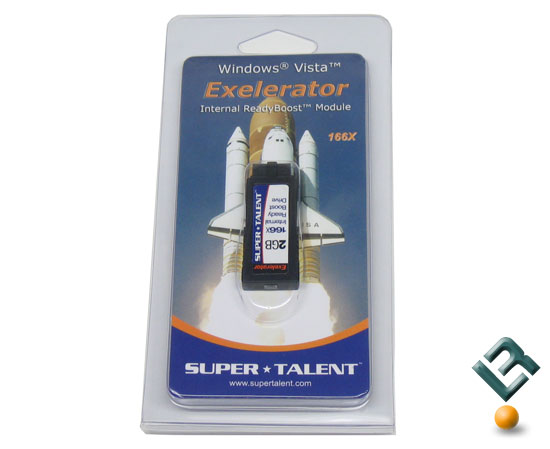
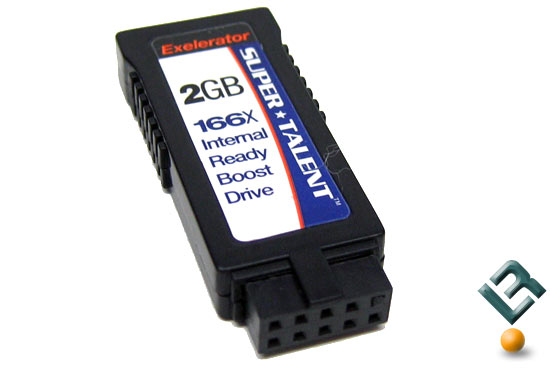
Super Talent has recently launched the Exelerator family of ReadyBoost drives that use an internal 9-pin USB header on the motherboard to help improve system performance for those that have already made the leap to Windows Vista. These innovative new Flash drives plug into a standard 9-pin USB header inside the chassis, on the motherboard, to function as a dedicated ReadyBoost drive. This is unique as other ReadyBoost drives are used on the external 4-pin plugs. The internal design is nice as nothing is sticking outside the case and after all what is out of sight is out of mind.

Super Talent Exelerator Ready Boost Flash Drive

Super Talent has rated the Exelerator family of drives to operate at 166X speeds with fast 25MB per second read speeds and sub-millisecond access times. Super Talent claims that the Exelerator drives are the perfect cost effective system upgrade to enhance a consumers Vista experience and that is exactly what we plan on looking at today here on Legit Reviews.

Super Talent Exelerator Ready Boost Flash Drive

Super Talent offers these drives in either vertical or horizontal connectors to accommodate space constraints within different enclosures. In addition to be able to pick the connectors the Exelerator is also available in 1GB, 2GB and 4GB versions. The Super Talent Exelerator ReadBoost Flash drive that we are looking at today is the 2GB vertical model pictured above.


source

Alienware Notebooks First to Feature RAID 0 Config for Solid-State Drives

With their lack of moving parts and ability to access data quicker than a traditional platter-based hard drive, solid-state drives are definitely the future for laptop storage, even if their limited capacity and high price have relegated them to luxury status in today's notebooks. That hasn't kept more and more vendors from offering SSDs as an option on select mobile systems, with Alienware becoming the latest manufacturers to offer the drives for its Area-51 m5550, Area-51 m9750, and Aurora m9700 notebook models. While offering a 32GB solid-state notebook drive isn't anything out of the ordinary, Alienware is also offering a mixed drive config of the 32GB SSD along with a conventional 200GB hard drive. Better still, the company is launching the first RAID 0 array consisting of two 32GB solid-state drives, which should improve drive performance even more. Of course, adding a SSD or two will boost the price of your new Alienware notebook considerably—one 32GB solid-state drive is a $500 option, while the SSD-plus-hard-drive combo costs $620, and the two SSDs in the RAID 0 config will pile on $920 to the system price. Note that the Area-51 m5550, the lowest priced Alienware notebook model, only offers the 32GB solid state alone. Alienware has already updated its Web site to offer the SSD option to buyers.

Tuesday, July 24, 2007

Seagate waves goodbye to IDE hard drives

Seagate has briefed that it's the end of the road for IDE hard drives. Or files, as IBM ludicrously continued to call them for years.

Nearly all top end drives are likely to go the serial ATA (S-ATA) route by the end of the year.

Parallel ATA has had a long run but will soon follow eight inch floppy drives, 5.25-inch drives and 3.25 inch floppies on the road to nowhere. Channel sources said Seagate roadmaps show IDE is at the end of the, er, road.

So soon vast libraries of information will be stored on drives and become as incomprehensible to future generations as Etruscan is to us.

On a brighter note, it looks like there will be a heck of lot of activity on the P-ATA front until the end of the year. And where Seagate goes, the others are sure to follow. Although no doubt as IBM's successor on the hard drive front, Hitachi Data Systems will beg to differ

Tuesday, July 17, 2007

Intel QX6850 is Kentsfield's last small step forward

BEFORE ITS YORKFIELD 45nm, and AMD's Phenom quad-core chips come out, Intel has done its final tuning and one last refresh of the 65nm Extremely Expensive Kentsfield, the QX6850.

It rates at 3GHz CPU and FSB1333, the fastest for a single-socket quad core right now. The chip is the same G0 revision as the last batch of QX6800 (2.93GHz / FSB1066) and X3230 (Xeon 2.66GHz / FSB1066) processors we had a look at over the past few months.

So, any real improvements in the clock speed headroom - with air only, first? After all, come on. No one would buy this to run it at the default rated speed. We ran it on the Asus P5K3 Deluxe mainboard using Intel P35 chipset with 2 x 1GB of fast and hot OCZ DDR3-1333 Platinum memory. Zalman 9700CNPS high-end copper heat sink / fan took care of the heat.

The CPU booted to BIOS - in and out of it - at 4.02GHz / FSB 1600 (multiplier x10) without much problem at 1.45 volts, whereas the QX6800 could muster about 3.86GHz on the same board with the same cooling and settings. So, there we go with a 4 per cent improvement - not much, but still a bit.

The stable operation in Windoze XP - i.e. the usual Sandra, Everest, 3DMark06 CPU stuff - could be sustained at 3.8 GHz flat with FSB 1520, compared with 3.7 GHz on the QX6800. The OCZ memory ran at DDR3-1520 in sync as well, with quite impressive 7-8-7-14 latency for an early DDR3 part at 1.7 volts. The Everest CPU and Sandra memory shots illustrate the 'achievement'.

In summary, the QX6850 is similar fare to the 6800 of a few months ago, with a bit more fine tuning added for a small final speed step up. This baby should ran fine at around or above 4.2GHz with decent US$150-class water cooling, and probably 5GHz with cascaded dual cryo-freeze units. This is as high as you'll go on Intel till the 45nm Yorkfield Extreme Edition surfaces some time soon after Intel's Fall IDF.

I hope AMD somehow comes out with a fast desktop quad-core Phenom too around that time, as it would make for an interesting pre-X'mas match - any delays there may result in Intel not exactly rushing to give us faster Penryn clocks at launch..

Oh by the way, one complaint: the CPU multiplier doesn't go above 11 - a problem if you want sky-high overclocks without sky-high FSB, where adding a notch, to say 12, wouldn't be a bad idea. How about that?