Black and White.
Showing posts with label google. Show all posts

Sunday, April 06, 2008

Google launches ‘voice search’

A year after it launched ‘voice search’ over phone service in the United States, Google launched the facility in Hyderabad. The beta version of the Google Local Information service on a toll free number 1800-41-999-999 was launched on March 31. The facility now is available from 8 a.m. to midnight 24x7.

Presently, Google is providing the local business information and movie show timings only. The Google chaps would give you address and contact numbers of any local business establishment and also the movie show timings.

The best part is the user calling the toll free number has an option to be connected to the local business he is looking for – again for free.The user also has an option of asking the Google to send the information over SMS to his mobile number, if he prefers. But the only irritant is that even the database of Google sometimes can have wrong numbers. When The Hindu tried to get the number of Yashoda Hospital in Secunderabad, indeed a number was sent – but a wrong one. However, on a second attempt, correct number was provided.

The SMS facility, would be of immense use to those on the move. Google would not only SMS the telephone numbers but also the complete address. Thus, ends the search for a ‘voice search’ facility in our city.

Blogged with the Flock Browser

Wednesday, November 07, 2007

Google Announces Android Mobile OS

Rumors about GPhone have been running since a long time. People expected the Google to come out with a revolutionary mobile device which will probably give some competition to Apple’s iPhone, but Google actually had a plan of their own.

Instead of working on a single mobile phone, Google has announced a Linux based mobile operating system called Android, and it will be freely available under mobile open source license. Google has partnered with 34 companies including Sprint, HTC, LG, T-Mobile, Motorola, Nvidia, and eBay. Android-based handsets are expected to roll out to costumers in second half of 2008.

Next week, Android Software Development Kit (SDK) will be handed over to developers, so that they can build third party apps for the forthcoming mobile operating system. By giving a head start to developers, Google is expecting lots of third party apps by the time Android-based phones start shipping. I’m really curious to see what Android has to offer for die-hard mobile users.

Thursday, October 11, 2007

Google India Launches 5GOOG Text Messaging Service

Finally, Google has launched beta version of their text messaging service in India. Mobile users can now use Google to access information on-the-move without using an internet-enabled mobile device.

Mobile users can use the service to check weather, movie show timings, search for businesses and more by sending text messaging their queries to 54664 ("5GOOG"). Supported mobile operators are Airtel, Aircel, BPL, BSNL and Reliance. Google SMS is a premium text messaging service, so it will cost you more than standard text messaging rate. Interactive demo of the service is available here.

google_sms_india

Google SMS is a premium SMS service; queries sent to 54664 will be charged at the following rates:

  • Aircel: Rs. 3.00
  • Airtel: Rs. 2.00
  • BPL: Rs. 3.00
  • BSNL: Rs. 0.80/1.00 (post-paid/pre-paid)
  • Reliance: Rs. 3.00

Here in India, text messaging is the most widely adopted form of communication, especially among teenagers. It makes complete sense to offer a quick way to look-up Google without having access to the internet.


----------------
Now playing: Guru - Ye Manpuru
via FoxyTunes

Thursday, October 04, 2007

Google pushes email to businesses

GOOGLE PLANS to spiff up its web based email services as a wedge to get its online office applications into corporate accounts, Yahoo News reports.

It will add new email security features, acquired when it recently bought Postini for $625 million, and more than double the email storage capacity for each business user to 25GB.

Postini's existing user base of about 36,000 businesses employing more than 11 million individuals will be able to sign up for free trials of Google's office suite of online business applications through June 2008.

After the initial free trial period, Google hopes to retain many of those business customers with subscriptions expected to cost $50 per user annually. If the plan is successful, online software as a service could add over 5 percent to Google's $7.5 billion in annual revenue.

Google's free web based gmail service will remain limited to 3GB per user email storage
----------------
Now playing: Unknown - Track08
via FoxyTunes

Sunday, September 02, 2007

Google.com 1997-2007

Here are the last 9 10 years of Google.com, compiled via Archive.org’s Wayback Machine:


In 1997 to early 1998, Google was still available at google.stanford.edu. The Beta sign wasn’t yet live.


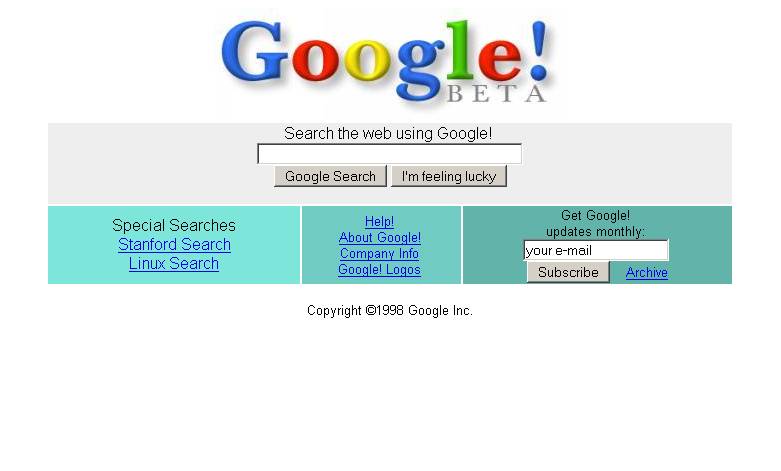
In 1998, Google was almost cluttered. Back then there was still some emphasis on “Stanford Search,” showing the roots of where Google comes from. Also, right on the front-page you could subscribe to the now extinct Google Friends newsletter. And of course, Google – with the not so pretty logo co-founder Sergey made in GIMP – was still in Beta...


In 1999, you can see Google realizes its search engine can stand on its own, and focuses on something the competitors at that time were slowly losing: total focus on search, with a completely uncluttered homepage. Google.com would never again have as little links as in 1999. The logo at that time is still a bit ugly... and Google still feels the need to explain what it does (“search the web using Google”).


In 2000, after having survived the Y2K bug (and about to be surviving the dotcom crash), Google localizes with a language box, and also offers jobs and an About page highlighted with blue bullets. In 2000, Google – out of Beta now – was proud to be named “Best Search Engine” by Yahoo Internet Life. Google is also pushing its WAP services on the front-page. On a side-note, I can see “SM” instead of “TM” next to the logo... Disclaimer: I don’t know if this Archive.org depiction of Google.com, with the non-centered logo, is completely accurate.


In 2001, some days after the 9/11 attacks on the World Trade Center, Google offers condolences to the attack victims. Along with the Madrid bombings years later, this would be about the only time Google shows news and support links on the front-page.
Also that year, Google pushes further services – Google’s now mostly discontinued Google Web Directory (which was based on the DMOZ.org Open Directory), and Google Groups (an archive acquired from Deja News). Above the search box, Google now shows you how many pages they search through (another feature that didn’t survive). Now if I had to put a date on it, I’d say 2001 was the year when truly every internet surfer (and their mom) would start to get to know about Google, but of course its growth was steady ever since it began. Disclaimer: I photoshopped this image because the logo wasn’t showing on Archive.org – I used the previous year’s logo.


In 2002, Google changes its mind about where to put additional links (which grow in number), and introduces blue tabs on top of the search box. The index size is now advertised in the footer position, and the three links to the right side of the search box are what we’re having today (advances search, preferences and language tools). Also in 2002, one of the first (the first?) weblog on Google started, and it soon became highly popular.


On this screen from 2004, Google celebrates Valentine’s Day. Not much else is new on the homepage, but the index size increased a whalopping 1 billion pages (not a huge increase by today’s standards perhaps, but those were different times only three years ago).


In 2004 (here showing with an Olympics logo), Google got rid of its tabs on top of the search box, making the page simpler again, while taking their company public. They now had a list of links (Web, Images, Groups, News, Froogle – no more Directory), as well as a “more” link to get to Google’s list of services. This approach scales a little better, but still only the most popular Google services (by the traffic they get, from what we know) will ever make it on the select few homepage links.


In 2005, Google’s index size almost doubled from last year. Google introduces Google Local to the front-page and gets rid of its “Business Solutions” link at the bottom.


In 2006 (the year Google somewhat lost their innocence due to search censorship cooperation with the Chinese government), chances are high you’re logged into one of the many Google services with your Google Account. That means you’ll also be seeing the somewhat awkwardly positioned personalized links pane in the top right. Other than that, the “Business Solutions” link returned, and there’s no more index size indicator in Google’s footer. Still, search for two wildcard characters and you might see something in the range of 25 billion indexed pages... we’ve come along way.


In 2007, a decade after its inception, the Google homepage undergoes a dramatical change (at least in relation to the minimalism of its layout): the navigation moves from above the search box to the top-left of the page, a move mirrored on other Google pages – like Google Image Search, or Google News search. The context navigation links now adjust to where you are, meaning they’re context-sensitive but also inconsistent (a potential issue from the point of view of usability). Now, Google’s motto is to have a “universal search,” integrating its different sub-search types (images, blogs, etc.) into a single experience. When you search for elvis presley, for instance, the search types web, music, video and images will be suggested, but when you search for iraq, the suggestions will be to further research in news, blogs, video, maps and images.


----------------
Listening to: b b - everybody
via FoxyTunes

Friday, August 24, 2007

New orkut Interface

orkut's blog promises a new interface for Google's ugly social network. "The one comment we always hear is how orkut's simplicity keeps long-time users coming back and new people signing up. So as we work away planning improvements to the site, we always keep this in mind."

orkut has recently changed the homepage and will launch a revamped interface in the weeks to come. "The change isn't live yet, but starting soon, we will start rolling-out the new look. To start, we will roll it out to a small group of users randomly selected, and will continue to do so until everyone is on the new site."

If you don't see the new interface yet, here's how it looks like:


----------------
Listening to: Hans Zimmer - He's A Pirate (Tiesto Remix) (Bonus)
via FoxyTunes

Wednesday, August 15, 2007

Ultimate GMail Collection: over 80 Tools and Tips

Firefox EXTENSIONS

Gmail Manager - manage multiple Gmail accounts, receive new mail notifications, view unread messages right from your browser statusbar. “…The Gmail Manager Firefox add-on obviates the need to keep your Gmail open in a tab all the time by displaying your email info in a statusbar pop-up…” [via LifeHacker]

GmailThis - excellent browser bookmarklet that lets you quickly forward highlighted text on any webpage via Gmail.

Better Gmail - integrates features of 10 Greasemonkey scripts into one firefox addon. These include: Google Reader integration, Mac-like skin, GCal integration, Fixed font and more.

GmailSkinz - powerful firefox addon with lots of cool features: change Inbox color , Add Google IG modules, insert images from Picasa albums, insert smileys, make navigation menu horizontal, hide unnecessary page elements, and more. (Note: some users reported having problems with this addon).

CustomizeGoogle - removes ads, switches you from http to https, hides the spam counter, quick contacts box, invite box and forces fixed font

Gspace - multi-platform firefox addon that turns your Gmail account into powerful online storage tool.

Gmail Search - search your Gmail account directly from the firefox search bar.

GcalQuickTab - toggle between Gmail and Google Calendar with keyboard shortcuts.

GTDInbox - turns your account into flexible and feature-loaded ToDo-management service (GTD = Getting Things Done)

DragDropUpload - this handy extension lets you quickly attach one or more files to your emails by dragging them over the “Attach a file” link.

Google Toolbar - official Google toolbar featuring one-click Gmail messages search.

FireGPG - integrates contextual menu with some useful functions: encrypt, decrypt, sign, etc. Read more on how to use it here.
—-

GreaseMonkey SCRIPTS (What is Greaseamonkey?)

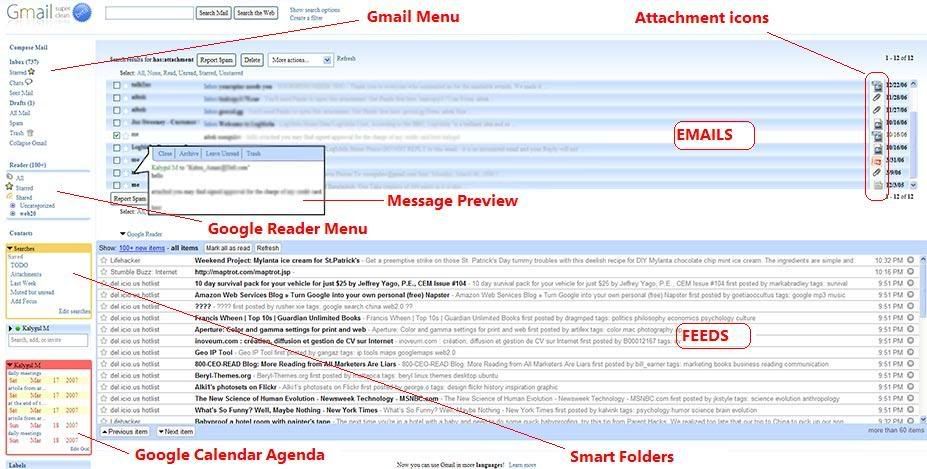
gmail greasemonkey scripts
(click to enlarge)

Gmail Super Clean - clean and distraction-free Gmail. Looks great, check it out here

Gmail Spam-count Hide - hides spam count link.

Google Reader Folders - adds a little box that lists the folders on Google Reader along with the number of unread items in each one.

Google Reader Integration - complete integration of GReader into Gmail. Excellent! (view). Jump to Google Reader Tools and Tips.

Google Calendar Integration - integrates GCal agenda into Gmail (view). Jump to Google Calendar Tools and Tips.

Conversation Preview - lets you quickly preview message contents right from the main inbox window (view).

Saved Searches - create ’saved searches’ (aka smart folders) and display them in the separate box in the navigation menu. Clicking on a search executes the saved query (view).

Folders4Gmail - allows you to create nested labels (i.e. labels and sub-labels) [via LifeHacker].

Gmail Date Search - adds a ‘Search by Date’ button to Gmail’s search form.

Label Colors - color menu labels to make them stand out better (view).

GMail Attachment Icons - adds attachment icons to emails, letting you see what kind of attachment an email has (HTML ,JPG, PDF….). Note: ‘Attachment icons’ isn’t a standard Greasemonkey script, it’s an addon for a similar Firefox extension known as Stylish. However it should work with Geasemonkey as well.

GmailTo - forces all ‘mailto’ links to open in GMail.

Fixed Font Toggle - adds a font toggle button so that messages can be viewed in a fixed-width font. Read more …

Gmail Macros - adds extra keyboard shortcuts to Gmail (i.e. “t” for move to trash, “r” for mark as read, “p” for mark as read and add to archive…etc). Read more…

Gmail Encrypt - encrypts your messages to prevent unwanted people from reading it. Just in case someone intercepts it while it’s on the way.

SSLGoogle - forces Gmail, Google Docs and GCale pages and their intra-links to open via secure connection (HTTPS).

Signature Float - moves your email signature to the top of the message rather than the bottom.

Attachment reminder - reminds you to attach a file to your Gmail, based on whether you have the word attach (ed, ment, etc) in the body.

—-

Desktop Programs and Web Apps

GmailDrive (Win) - adds a new virtual drive (’Gmail Drive’) to ‘My Computer‘ folder. Drag’n drop files on top it to store them in your Gmail account.

gDisk (Mac) - Mac alternative for the above mentioned GmailDrive.

Gmail ToDo - handy desktop application that allows you to quickly add and save todo’s in a ‘ToDo’ label in your Gmail account.

FlipMail - free service for forwarding some/all of your emails to your mobile (US Only).

Gmail Loader - cross-platform (Win, Mac, Linux) tool to help you load all your old message archives from other email accounts into Gmail. [via LifeHacker].

Icon Generator - minimize spam exposure by getting an image for your email address and safely publish it wherever needed.

Blogsigs - lets you auto-include the title of your latest blog post in your email signature. Works with Gmail.

GMail Mobile - access Gmail from your mobile.

Google Talk - Google’s IM service which is fully integrable with GMail.

You’ve Got Gmail - Gmail plugin for Trillian (IM client)

Unbl0ck - web-based proxy for accessing Gmail from places where it’s blocked (work, school,…)

iPhoto2Gmail (Mac) - allows you to instantly email images from within iPhoto. Send either original or optimized (resized) image versions.

MailPlane - “…A full fledged mail client for Google Mail and Mac OS X “. Mail client combining best of Gmail with Mac’s simplicity anduser interface. It’s still in beta though, but you can request invite from here.

GmailFS - mountable Linux filesystem which uses Gmail as its storage medium

—-

GMail Notifiers

- for Windows: GMail Notifier (official), GTray, Notifier2
- for Mac: GMail Notifier (official), GCount, Gmail+Growl 2.0
- for Linux: KCheckGmail
- for Firefox: E-Mail Notifier Toolbar, Gmail Notifier

—-

GMail HowTo’s (over 20 all purpose HowTo guides)

HowTo: Build advanced Gmail filters and persistent searches.
HowTo: Import your archived emails into Gmail.
HowTo: Access Gmail account of someone who dies.
HowTo: Force Gmail notifier to use SSL (instead of HTTP).
HowTo: Import contacts from Hotmail to Gmail.
HowTo: Redownload Gmail messages into outlook.
HowTo: Backup your Gmail messages using Google Groups.
HowTo: Create Google Calendar events from Gmai.
HowTo: Set Gmail as default mail client in Ubuntu (without any additional software).
HowTo: Sync. Google Calendar and Gmail contacts to your desktop.
HowTo: Use rich HTML email signatures straight from Gmail (req. Better Gmail extension).
HowTo: Manage all your email account with Gmail. (Excellent guide for folks with several emails.)
HowTo: Back up Gmail with Fetchmail (Windows).
HowTo: Configure and access Gmail on Mozilla Thunderbird.
HowTo: Use Gmail over IMAP and tag your mail, too.
HowTo: Sync. Micr. Outlook, GCal, Gmail, iPod, and mobile phone.
HowTo: Encrypt and sign Gmail messages using FireGPG extension (see above).
HowTo: Work with Gmail Attachments like a PRO.
HowTo: Attach and send blocked file types, i.e. ‘*.exe’.
HowTo: Find that ’someone’ who gives away your email address to spammers.
HowTo: Gmail on Home Linux Box using Postfix and Fetchmail.

—-

Gmail Shortcuts

- Secret keyboard shortcut for deleting messages [labnol.blogspot.com]
- Shortcuts for Special Gmail Labels [googlesystem.blogspot.com] - for ultra quick navigation
- Gmail Shortcut List: handy, printable list of keyboard shortcuts for the Gmail [comp.nus.edu.sg]

—-

Tips

- Three solid Gmail productivity tips [mattcutts.com]
- What to do if your Gmail is nearly full [bnura.blogspot.com]
- Jim’sTips: huge collection of basic gmail tips [g04.com]


----------------
Listening to: Vijay Yesudass, Gomathi Sree & Chorus - Sahara
via FoxyTunes

Monday, August 13, 2007

Crop your Profile Picture in orkut

Croping a DP is soo easy

It's super easy: just select the file, click upload and you'll see a cropping window on the next page. Drag the window with your mouse to select the part of the photo you'd like to be your picture. You can also change the size and the shape of the window by dragging the corners to include or exclude as much of the backdrop as you'd like. When you're done, click the "crop photo" button, and, voila, you will have a new profile photo. Or, if you think the original photo is good enough, click "use original" and the whole, uncropped image will become your profile photo. If you would like to experiment further with photo options, just click "cancel" and upload another photo.

Google Pack Adds StarOffice


Google Pack, the collection of applications recommended by Google, includes a new software: StarOffice, an office suite developed by Sun. In 2000 Sun released StarOffice's source code, which became the foundation of OpenOffice.org, an open source project sponsored by Sun.


StarOffice 8 is a full-featured office suite that contains a word processor, a spreadsheet tool, applications for presentations, databases, math formulas and drawing. It has support for most Microsoft Office formats (except for the formats introduced in Office 2007), but it can also export documents as PDF out of the box. The software normally costs $70, but it's available for free in Google Pack. It's worth noting that StarOffice has a huge installer (more than 140 MB), so you should download it only if you have a fast Internet connection.

It will be interesting to see why Google didn't choose to include OpenOffice.org, the primary difference between StarOffice and OpenOffice.org being that StarOffice includes some proprietary components like clip-art graphics, fonts, templates and tools for Microsoft Office migration.

The next step would probably be the addition of a plug-in that lets you synchronize local documents with Google Docs & Spreadsheets, so you can have the best of the both worlds: edit complicated documents offline, collaborate and store files securely online. For now, StarOffice is integrated with Google Search and Google Desktop.

Sunday, August 12, 2007

Orkut now allows Multimedia Content inside Scrapbook

Google has finally made it possible to send rich-content scraps to your friends. You’ll be able to insert images, audio, video and embeddable objects into the scrap. They are rolling this feature on a profile-by-profile basis, so it might take few days to appear on your profile.

Here’s how you can send rich content scraps:

  • Add images:
    Copy and paste urls ending in .jpg, .gif, .png or .bmp and the image will appear in the scrap.
    for example, http://example.com/example.jpg
  • Add videos from YouTube and Google Video:
    Copy and paste the url and the video will appear in the scrap.
    for example, http://youtube.com/watch?v=videoid
  • Add podcast/audio:
    Copy and paste the url of an audio file and an audio player will appear in the scrap.
    for example, http://example.com/example.mp3
  • Add html-embeddable objects:
    Create or upload your content at sites such as photobucket.com, imageshack.com, rockyou.com or slide.com. Copy and paste the html embed code to share it with your friends.

I think it’s pretty cool to watch videos or images without having to leave the scrap page. In order to prevent spammers from misusing this feature, Google asks you to fill the word verification, if you’ve got embed, link or image in your scrap. Additionally, rich content scraps can only be sent to friends, which mean if you are not connected to someone, you can’t send a rich content scrap to that person.

Nowadays, Google is trying it integrate more and more service with Orkut. They did it with Google Talk, then YouTube / Google Videos and now Picasa Web Albums. I think they are taking a step in the right direction by adding new features to Orkut, but they should seriously consider re-designing the user interface. I’m quite sick of the ugly blue-pink color scheme. Is it just me or you too feel the same?


----------------
Listening to: Vijay Yesudass, Gomathi Sree & Chorus - Sahara
via FoxyTunes

Friday, August 10, 2007

Google Custom Search Blog Hacked?

Google's automatic detection gear detected google blog as spam and deleted all its post lol.

Google Custom Search Blog Hacked?

The official Google Custom Search blog (as linked from the Google Blog) has a very strange post up today:

Google Custom Search, is the wonderful product from Google which many webmasters have been looking and dream for. It allows webmasters to create their own custom search engines to search only the sites he/she wants.

Also Google Custom Search is integrated with Ad-sense, which means make money while keeping users on your site for longer time with custom search engine.

I’ll cover up more on this powerful tool very soon in my next blog.

Good Luck for all the Custom Search customers(??).

Cheers,
Srikanth

Apart from grammar problems and misspellings of Google Products (like “Ad-sense”), the whole posts seems skewed in a funny, non-official direction. “Also,” as Ionut Alex. Chitu of Google Operating System who sent this in remarks, “all the posts from this blog were deleted.”

It wouldn’t be the first time an official Google Blog was hacked, or kidnapped due to a misconfiguration by a Google employee, as these two posts illustrate.


and this is wat google replid

"Whoops! We accidentally classified ourselves as spam, and our ever-perceptive Blogger settings caught us. The Custom Search Blog has since been restored, and we’re taking steps to ensure this doesn’t happen with other Google blogs in the future. Other Blogger users can make sure this doesn’t happen to them by reporting any problems to the Blogger support team via the Blogger Help Center at http://www.blogger.com/problem.g. We can then investigate."


----------------
Listening to: DJ Tiesto - in my memory
via FoxyTunes

Tuesday, August 07, 2007

Google takes first end-user OIN licence

SELF-PROCLAIMED goody-two-shoes, Gurgle has taken the first end-user licence from the Open Invention Networksm (OIN), a consortium of software patent holders pledged to support open sauce software development around Linux. OIN describes itself thus:

Open Invention Networksm is an intellectual property company that was formed to promote Linux by using patents to create a collaborative environment. It promotes a positive, fertile ecosystem for Linux, which in turns drives innovation and choice in the global marketplace. This helps ensure the continuation of innovation that has benefited software vendors, customers, emerging markets and investors.

In a press release dated today, Jerry Rosenthal, CEO of OIN, said "As we look to grow the Linux Ecosystem, we are pleased to have Google become our first end-user licensee. Google is one of a growing number of companies, of all sizes, that value the openness and collaborative culture of the Linux community. We applaud their support for Linux."

As the first end-user licencee, Google gains lawsuit protection pledged by patent holding members of OIN, which include IBM, NEC, Novell, Philips, Red Hat and Sony.

Chris DiBona, Google open source programs manager, said "Linux plays a vital role at Google, and we're strongly committed to supporting the Linux developer community. We believe that by becoming an Open Invention Network licensee, we can encourage Linux development and foster innovation in a way that benefits everyone. We're proud to participate in OIN's mission to help Linux thrive."


----------------
Listening to: John Powell - Extreme Ways (Bourne's Ultimatum, by Moby)
via FoxyTunes

Choose a thumbnail for your YouTube Video

You might come across videos on YouTube which have blank or terribly looking thumbnail image. Usually, when a video is uploaded, YouTube automatically picks the center frame and sets it as a thumbnail image. Users have no really control over these thumbnail images, except for some smart tricks to get their desired thumbnail image, but most of us don’t have the time or patience to practice those tricks.

YouTube Thumbnail Option

YouTube realized this problem, and they’ve made it possible for users to pick one out of three thumbnail images. YouTube captures three thumbnail images at x/4, x/2 and 3x/4 seconds and video owners can choose any one of these thumbnail images by clicking on “Edit Video Info” button next to their video on My Videos page.

Sunday, August 05, 2007


The Observer of London is reporting that Google might be working with HTC and mobile/telecom giant Orange to build a Google Mobile Phone, which could possibly have Google software inside the device, and would be able to do many of the web tasks smartly. The device, article speculates, could go on sale in 2008. Orange and Google, both declined to comment.
A Google-branded phone could include a browser that uses Google’s transcoder to optimize web pages for the phone, easy to access Google search, maps, Gmail, Blogger and maybe more.
It would be interesting to see if this comes to fruition. Google, in recent months has become increasingly aggressive about its mobile ambitions, and is pushing into the carrier space, though there have been some snags.


For Orange, this could be a valuable asset in its triple play ambitions. The company owns broadband businesses across Europe, and has access to 3G networks, and is owned by France Telecom. It could use Google’s web expertise to take on its rivals, by offering web-mobile hybrid phones, and at the same time get a slice of mobile advertising revenues. I know, sounds far fetched, but not out of the real of possiblity.

Source


----------------
Listening to: www.TamilMahal.Com...Mp3 - Paartha Mudhal
via FoxyTunes

Friday, July 27, 2007

Digg fires Google

DIGG HAS dumped Google as its online advertising partner saying it wants an outfit which was young and willing to take risks.

Apparently Jay Adelson, the company's chief executive officer was actually talking about Microsoft when he used the "young and willing to take risks" comment.

According to the Sydney Morning Herald, Adelson said that Microsoft had a young ad service which was innovative and willing to work with Digg on "the cutting edge" which sounds jolly painful.

For the next three years Vole will have to find small adverts to appear on contextually relevant text links on Digg.com.

The outfit is Vole's first high-profile customer for its adCenter platform since the company signed up Facebook.

Of course it all might backfire. Digg is the domain of those who do not exactly like Microsoft. Linux and Apple are the most talked about subjects on the site and Vole, next to the RIAA, is the most hated thing in its "black and white" universe.

Saturday, July 21, 2007

Google to bid on the 700Mhz wireless spectrum

Google 700mhz spectrumWe all know that the 700Mhz wireless spectrum is going to be opened by the FCC and the companies will have to bid on an auction, for it. Google has also announced that they will bid about $4.6 billion, if FCC meets their demands. They want FCC to allow the 700Mhz spectrum for “open applications, open devices, open networks, and open services“, demand that FCC’s Chairman Kevin Martin seems to agree with.

How-to: Add Search to Google Reader

It’s pretty unbecoming for a search giant like Google to not add search functionality to Google Reader. Fortunately this situation isn’t so bleak for Firefox users who happened to have greasemonkey installed. This greasemonkey script adds a search box to Google Reader which also lets you to chronologically sort results and limit results count.

Bonus points if you happen to use Google Reader offline using Gears, because this greasemonkey script enables you to perform search on 2000 recently synced offline items. Both these scripts have their own limitations, but until Google adds search to Google Reader, these scripts are definitely worth a try.

New Custom Embedded Video Player from YouTube

YouTube has rolled out the custom player feature which lets you customize your embedded player with nine colorful themes. The best part is that you can create a playlist of videos from your favorite or uploaded videos.

It’s pretty simple to create your custom player: Just choose a theme and layout, select a playlist of videos and generate the code. This custom player comes really hand, if you have a series of videos and don’t want to embed it separately. You can watch each video without having to leave the page.

Unfortunately, the custom player really needs 500 pixels by 430 pixels, otherwise the borders get clipped and it doesn’t look so good. I think it would have been awesome, if we had the option to choose our custom player while embedding other videos. An option to choose our own colors (just like how we do with our AdSense ad) would have been even better.

Tuesday, July 17, 2007

Youtube intrudes into your bedroom

One of the beauties of a "truly open" device it's that it's not restricted by its maker on what you -or other third party developers- can do with it. In fact, the OSD mailing list is full of advocates trying new bold ideas that push the envelope on the hardware of this affordable Linux-powered PVR and Media Player.


The tiny little OSD device and its remote control

Recently, Neuros announced its latest software addition to the OSD: the Youtube player. What this means is that Youtube content is now viewable from the comfort of your favourite couch, and you can search for videos or browse around the available content just using your OSD remote control. It takes a while to learn to type English words with the numeric remote but the On-Screen-Display makes things simple, specially for anyone who has entered SMS messages on a mobile phone.


On-Screen menus as seen in the latest firmware
Here, how to get to the Youtube player

But first I should mention something about firmware. Neuros Technology offers three levels of firmware: "release" versions, "beta" versions where new features are tried and which are generally more stable than developer builds, and "developer" releases which contain the "bleeding edge" features and on which some new features might stop working from one release to the next. In my case, I tested the "Youtube browser" as present in the "dev" firmware 3.33-x.7d build, which can be downloaded from here.


Just plug the OSD to your home network with a broadband connection...
Wired RJ45 Ethernet is included, USB based Wi-Fi connectivity is in the works..


Let's try a search... our favourite exec, Carly Fiorina...

The OSD firmware is delivered as a single ".upk" binary file, and the update procedure couldn't be simpler: just copy the downloaded file to a SD card, insert it into the OSD's SD socket, then using the remote control select "Browse", manoeuvre until you highlight the ".upk" file in the SD card, and press [Enter] on the remote, and select "update firmware".

The latest release has added an option in the configuration screen which allows the OSD device to check automagically over the Net if there's a new firmware version available. You can even select what kind of firmware you want to install: release versions, beta versions, or the "developer" releases.


Youtube search results!. Thumbnails will be added in the next firmware update...
Always remember this is a work in progress

Youtube from the couch
After viewing Youtube videos from the comfort of my comfy couch on a 29" CRT TV, I have yet another productivity reducer. The videos looks surprisingly sharp, and the few examples I tried didn't look pixelated at all. In fact Youtube videos on a TV look much, much better than grainy mpg and .avi videos downloaded from the web, burned to CD-r and played on the Philips DVP642 DVD player.


Surprise: Youtube videos played nicely on the 29" CRT
(Artifacts in pics caused by the thick glass on the flat-screen CRT affecting the digicam, and not seen by humans :)

The icing on the cake was typing "Carly Fiorina" and watching the "HP Garage" parody on the big screen. Very good indeed. Just make sure your broadband connection is 512 Kbps or faster, otherwise you will get occasional pauses, just as it happens on PC web browsers when playing Youtube content as well. Next on the developers' to-do list is adding thumbnails/pictures to the Youtube search results, instead of just displaying the video titles as is the case with the firmware build I tested.


Auto-update of the firmware has been added to the latest "dev" experimental release
Users afraid of encountering bugs should stick to "release" or "beta" builds

Conclusion
There are other digital video recorders and a "media centre" players, but very few are as affordable, expandable and can save and play video from SD cards, CF, Microdrives, external USB 2.0 hard drives, even shared volumes across your home network, AND stream and play Youtube videos from the web effortlessly. The OSD now does all this, and at $225 the OSD is a bargain. Watching Youtube content on the big screen will surely be of interest not only for your individual amusement, but also has the side effect of keeping relatives away from your PC, as it allows you to show off your own -or others'- on-line videos without "sticky chocolate fingers" from kids, aunts or friends messing up your computer. Oh, did I mention that it supports both PAL and NTSC?.

A full review of Neuros Technology's Open Source Device (OSD) media centre will be posted here soon. But I should warn you that it will surely be incomplete and obsolete as soon as it goes live. Neuros' programmers and the active community of users, coders and advocates will surely keep "moving the goalposts" and continue extending this tiny marvel to do more and more every passing week. Suffice to say that some are hard at work to create unit-to-unit video streaming -say of live TV feeds- as I write this. Stay tuned, -or streamed

Friday, July 13, 2007

FeedBurner Adopts Two-Year-Old, Renames it 'FeedSmith'

t's official. We've signed adoption papers for the popular WordPress plugin that seamlessly redirects requests for an ordinary feed (from self-hosted WordPress blogs) to your super-powered FeedBurner feed. This plugin — a toddler in age, but a prodigy with HTTP requests — will be made available directly from FeedBurner as "FeedSmith." It was originally raised by the multi-talented Steve Smith, who's trusting us to ensure its continued well-being.

If you aren't already familiar with this handy plugin, you should know it's a reliable way to track your entire feed-reading audience and can even result in that elusive "bump in subscribers" effect when you first activate it. What the plugin accomplishes, in Steve's own words:

Using some WordPress plugin magic, and user-agent detection, this plugin simply forwards all your feed traffic to FeedBurner. The plugin will detect all ways to access your feed (e.g. http://www.yoursite.com/feed/ or http://www.yoursite.com/wp-rss2.php, etc.), and redirect them to your FeedBurner feed so you can track every possible subscriber. It will forward for your main posts feed, and optionally your main comments feed as well.
An older version used to require changes to your Apache server's .htaccess fille; the current version has no such requirements so it will work with any permalink structure you might use. Not only that, FeedSmith is compatible with WordPress versions 2.x and 1.5. In other words, it should work for pretty much everyone who uses a self-hosted WordPress installation. (If you are currently using Steve Smith's original "Ordered List FeedBurner plugin" and it is working to your satisfaction, you do not need to upgrade or switch, but keep in mind any new versions of this plugin will be available directly from FeedBurner in the future.)